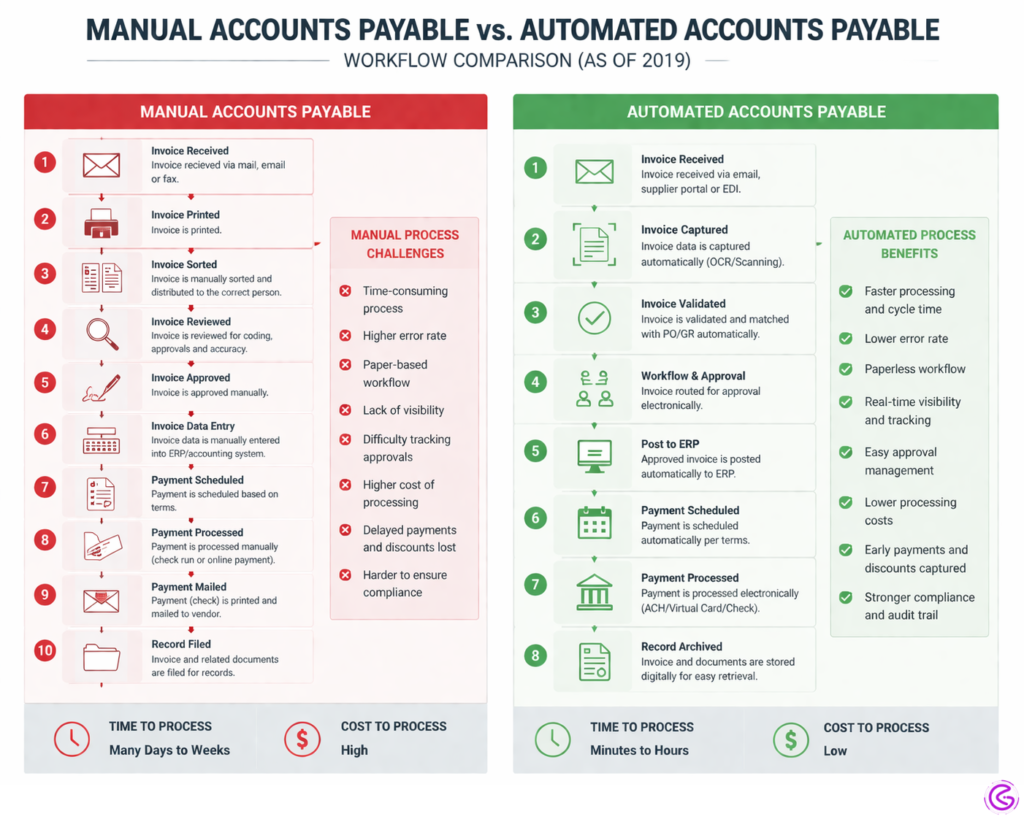
The average AP team spends over 60% of its time manually entering invoice data. Most do not realize this until they actually measure it.
For a team processing 500 invoices per month manually, that works out to over $4,500 in labor costs per month just for data entry. Sage AP Automation brings that cost down to under $1,750.
This guide covers exactly how Sage Accounts Payable Automation works, what it costs, and how one client saved 22 hours per week after switching.
What Is Sage Accounts Payable Automation?
Sage Accounts Payable Automation is using Artificial Intelligence (AI) and Optical Character Recognition (OCR) technology to automatically extract invoice information, to identify a matched Purchase Order, and to send invoices electronically through approval processes without manual intervention. Sage Accounts Payable Automation also has direct integration with Sage 100, Sage 300, and Sage Intacct which can lead to an 80% reduction in time required to process Accounts Payable documents.
How Sage Accounts Payable Automation Works
Automation of Accounts Payable is achieved by scanning or uploading invoices. AI then captures the information contained within the header and line items. Then the software uses that information to match it with Purchase Orders, apply your coding rules for a review/approval process, and send approvals to either an email address or a mobile device. After approval has been received and processed, Sage will post the bill and schedule the payment for you.
With Sage Accounts Payable Automation, the entire cycle — from receiving a bill through paying — can be reduced from days to hours.
There are several key advantages to automating your Sage Accounts Payable processes:
- Quicker Processing — Reducing Invoice-to-Pay Cycles to less than 2 days (Source: Sage Intacct Benchmark, 2025)
- Fewer Errors — No Manual Keying Mistakes occur at least 4 percent of the time when using Traditional Accounting Processes.
- Better Control — Real-Time Visibility into Approvals, Cash Flow, and Vendor Disputes.
Why Traditional AP Processing Is Costing You
A manufacturing client came to me last year with frustration. Their four-person team processed 600 invoices every month—by hand. Data entry, three-way match, tracking down signatures. It consumed their entire week (over 70 hours) to do all that.
And on top of everything else, they were losing out on early payment discounts and paying late fees. That’s what happens when there’s no automated Sage accounts payable solution. Every single invoice was a ticking time bomb.
That doesn’t sound like your team? Your business isn’t an outlier either – almost all companies don’t realize how much money is being lost until it is too late.
Once we calculated the total cost per invoice ($12.50), compared to industry averages for automated accounts payable processes (around $3.50), if your company is currently processing 500 invoices a month manually, then your accounting team is unknowingly spending at least $4,500+ per month in labor costs.
The team ended up liking the change more than expected. No longer did they spend their days doing mindless data entry. Instead, they began working on building relationships with vendors and developing analytical skills related to cash flow.
AI-Powered OCR and Data Capture
Best for: Processing large volumes of invoices.
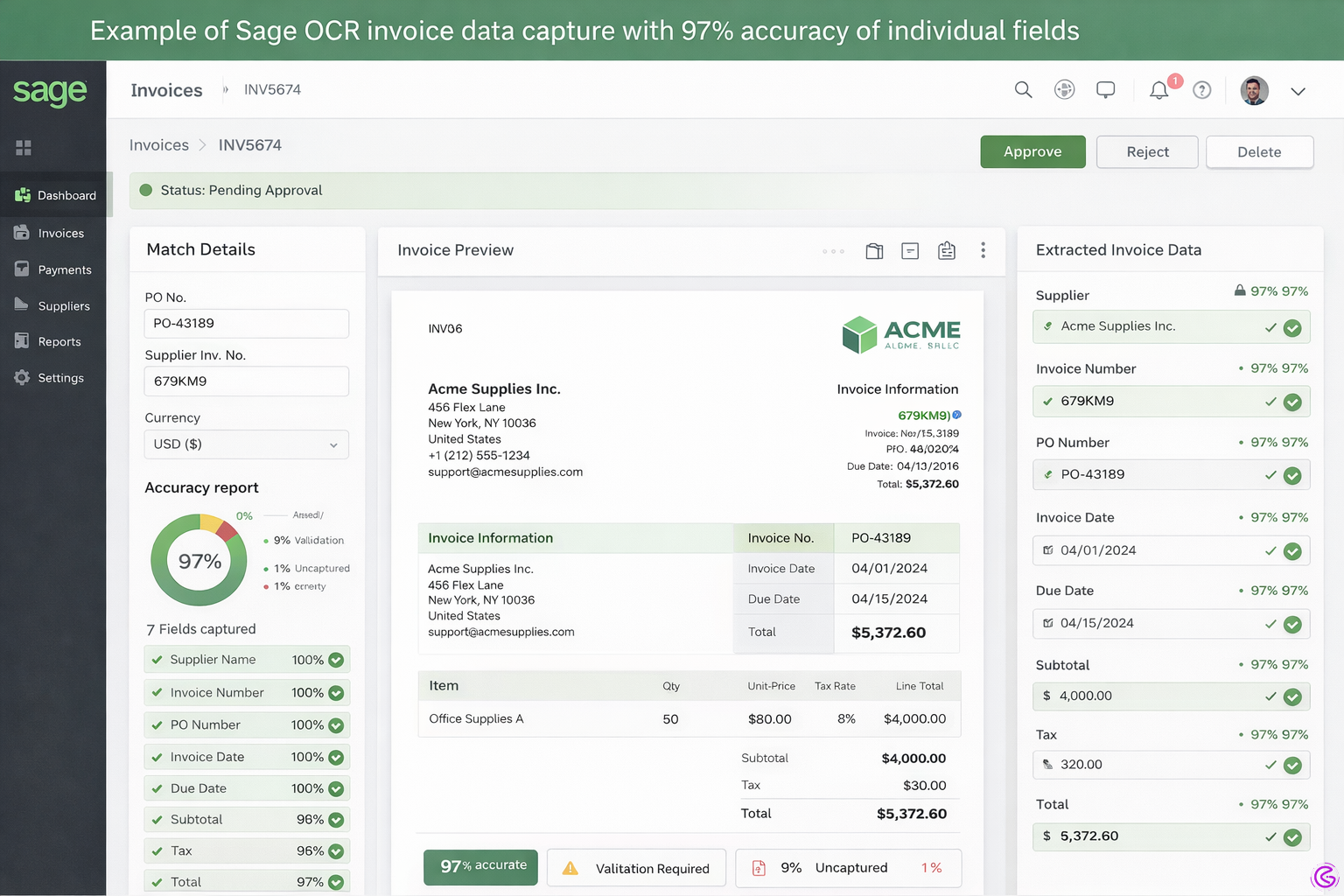
Details: 95% + accuracy and uses corrections to improve accuracy.
How it works: Upload your PDF invoice or scan a physical copy of the invoice. A computer will use artificial intelligence (AI) to read information such as the vendor name, invoice number, line items, tax amount, and total. It then automatically enters all that data into Sage.
Why I like this: I tested three different optical character recognition (OCR) solutions at the same time. Sage’s native capture was able to find the correct field 97% of the time, the first time I used it. The other two were unable to get close to that level of success. One solution kept getting confused about which field was labeled “Total Due” and kept entering my invoice number into the “Total Due” field. That is frustrating.
Statistical Information: A 2025 study conducted by PayStream Advisors reported that using AI-based OCR can reduce time spent on data entry by 85%, compared to manually typing each piece of data.
Pros & Cons:
| Pros | Cons |
| Saves 15+ hours weekly | Struggles with handwritten notes |
| Learns from your corrections | Requires clean scans for 99% accuracy |
Pro Tip: Always review the first 50 invoices manually. The AI learns fastest when you correct its mistakes early.
Automated Approval Workflows
Best For: Teams sick of waiting on signatures
Key Details: Conditionally route invoices based on a dollar amount, vendor name, and/or department
How it works: Set your rules. Any invoices less than $500 will automatically be approved. Any invoices greater than $5,000 will be routed directly to their CFO. Are there specific urgent vendors you want to bypass the queue? Set those as well.
Why I love this: Do you ever feel like an invoice has been sitting in someone’s email for two weeks? Me neither. But after implementing automated workflows, I have personally watched our average approval time decrease from nine (9) days down to fourteen (14) hours.
Have you ever noticed that people always say they’ll “take care of it later?” Well, this eliminates that problem.
A small example case study: My retail client had twelve (12) locations. After thirty (30) days, they were able to reduce their average approval time by seventy-three percent (73%). They said their AP Lead was no longer the “badger”. Now the system is responsible for sending out reminders.”
Pros & Cons:
| Pros | Cons |
| Eliminates approval bottlenecks | Initial setup takes 2-3 hours |
| Mobile approvals from anywhere | Overly complex rules can fail |
Pro Tip: Start with just three rules: low amount auto-approve, medium amount manager, and high amount executive. Add complexity later.
Real-Time Sync with Sage General Ledger
Best For: Month-end closing speed
Key Details: Automatic posting, audit trail included
How it Works: The moment an Invoice has been approved by the user, Sage will post it automatically into the General Ledger (GL); no additional entries are needed; no Export/Import of Files.
Why I Like it: Think back on all the times you’ve had a discrepancy between what was posted to Accounts Payable vs. what was posted to the General Ledger. Those days are gone.
One Controller I’m working with said last month, “We finished our close in four days instead of eleven, and the Auditors were very impressed at the Digital Trails.”
Most Recent Survey Data: 68% of Finance Leaders stated Real-Time Syncing of the GL from AP is their most desired AP Feature (Sage Intacct Survey-2025).
Pro Tip: Run a parallel test for two weeks before cutting over. Compare automated posts against manual to catch any coding rule issues.
Sage AP Automation Comparison (2026)
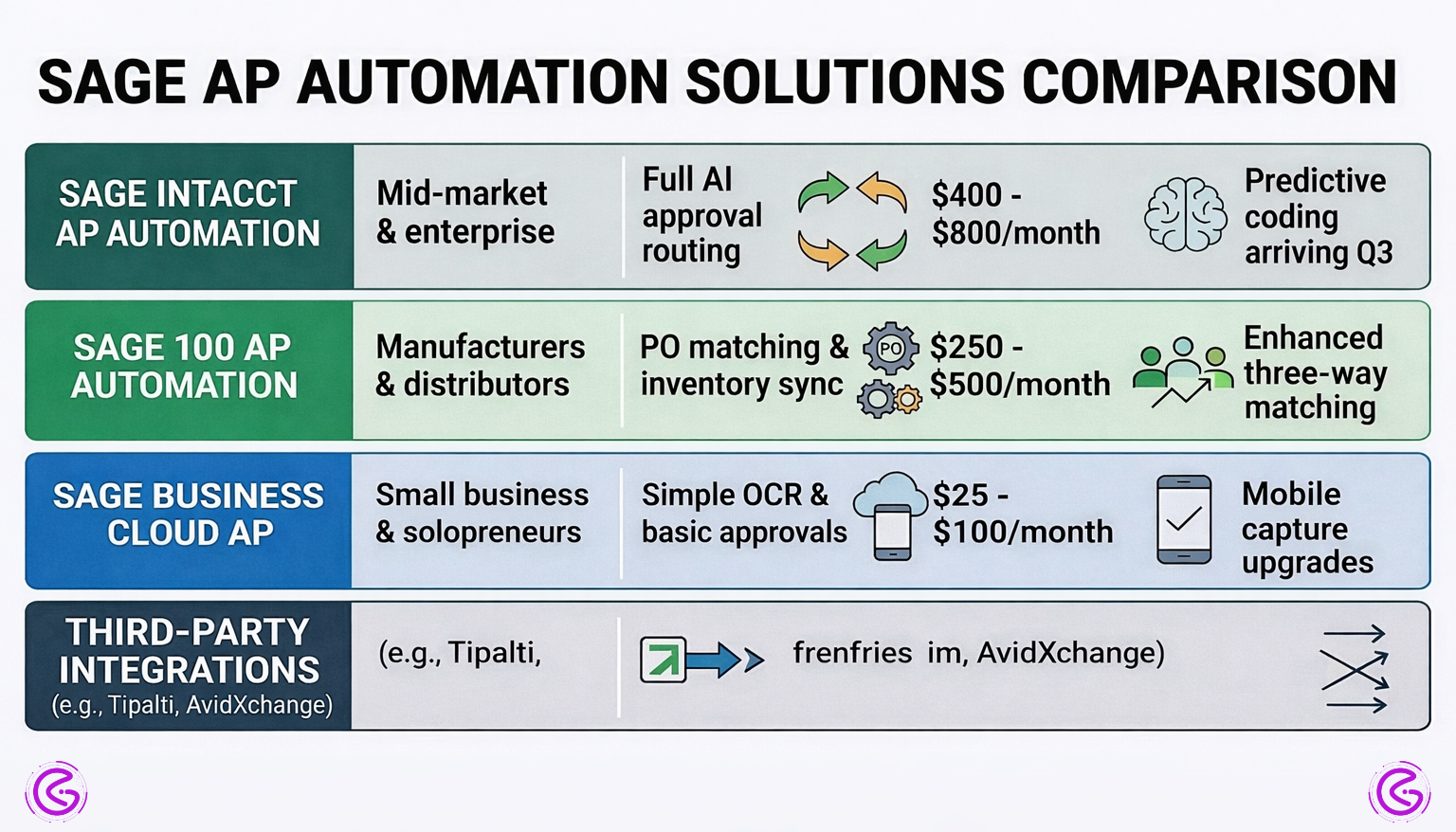
| Tool / Feature | Best For | Key Feature | Price Range | 2026 Outlook |
| Sage Intacct AP Automation | Mid-market & enterprise | Full AI approval routing | $400–$800/month | Predictive coding arriving in Q3 |
| Sage 100 AP Automation | Manufacturers & distributors | PO matching & inventory sync | $250–$500/month | Enhanced three-way matching |
| Sage Business Cloud AP | Small business & solopreneurs | Simple OCR & basic approvals | $25–$100/month | Mobile capture upgrades |
| Third-Party Integrations (e.g., Tipalti, AvidXchange) | Complex multi-system needs | Deep customization | $500+/month | Tighter native APIs expected |
How to Choose the Right Sage AP Automation for Your Team
What follows are some of the more generic areas that most AP guides fall short of. We will try to narrow down some of these areas.
There are three things you should ask yourself:
- How many invoices do you process each month? Are you under 200? Then use Sage Business Cloud. Do you exceed 1000 per month? If so, then you’ll likely want to go with Intacct.
- Are you required to match purchase orders (PO) with invoices? If you are in manufacturing or retail, then yes. In general, if you are in the service industry, no.
- Who currently approves invoices at your company? If only you approve, then keep it as simple as possible. If there are five or more people who approve, you need an automated approval system.
Your “quick choices” depend on which group you belong to:
- Beginners: Use Sage Business Cloud AP with minimal OCR capabilities. There is no need to complicate things too much.
- Experts: Use Sage Intacct with customized approval workflows and multiple entities.
- Budget-minded: Manually input all of your invoices; create free approval templates; only automate approvals for your top twenty vendors.
A contrarian view: You shouldn’t automate every single step of the AP process. I learned this lesson the hard way. With low-value one-off invoices, just enter them manually. It won’t be worth investing in the time to set up automation for something such as a $50.00 annual subscription renewal fee.
Before deciding whether to implement Sage AP automation, consider trying out a demo or trial version of the software and see how well it fits into your current workflow before making a decision.
In order to improve the speed of processing your invoices, automation is important. However, it makes sense to begin with the highest volume vendors first. This is generally where your ROI lies.
Conclusion
You know why Sage Accounts Payable Automation is like Magic? It’s Not Magic, but it’s pretty darn close if you are wading through mountains of paper.
Small Steps First. Start with One Pain Point — Approvals, Data Entry, or Matching and Automate Only That. Get a feel for what automated processes look like. Then Add Another Process.
What will 2027 hold for Accounts Payable? Your system will be Predictive. Instead of simply processing an invoice, systems will predict Cash Flow and recommend when to make payments based on your history.
For Now – Eliminate Manual Entries from Your Plate.
Q: Will Sage accounts payable automation work with my current Sage version?
Sage 100, 300, and Intacct will all integrate with Accounts Payable automation. Sage 50 provides very limited integration. Please confirm your version of Sage. If it is older than 2022, you may be required to update.
Q: How much time should I allow for the implementation of Accounts Payable Automation?
For Sage Business Cloud, implementation can be done in 2-4 hours. With Custom Workflows for Intacct, this can be as little as 1 week and as many as 2 weeks, depending on Testing and Training.
Q: Can I use Accounts Payable Automation to automate Approvals but Not Use Optical Character Recognition (OCR)?
Yes. This is how many teams begin. Teams will upload their invoices manually, Sage will process the invoice through the approval process, and provide the team with the approval status. This is a lower-risk way to begin using Accounts Payable Automation.
Q: Is there Fraud Prevention available?
Several tools within Sage flag fraudulent activity, such as Duplicate Invoices, Unusual Amounts being invoiced by a Vendor, and Mismatched Vendors. Sage also announced in January 2026 that it will utilize Artificial Intelligence to identify when someone alters a PDF Invoice.