The beginning of text processing accounts payable functions, such as invoice processing, payment approval, and vendor relations management, will eventually become a bottleneck for many companies that continue to grow.
If you are currently using any combination of spreadsheets, paper documents, or e-mail chains to manage accounts payable, then you are well aware of how easy it is for errors to occur when using these methods, and how much time can be wasted waiting for approvals.
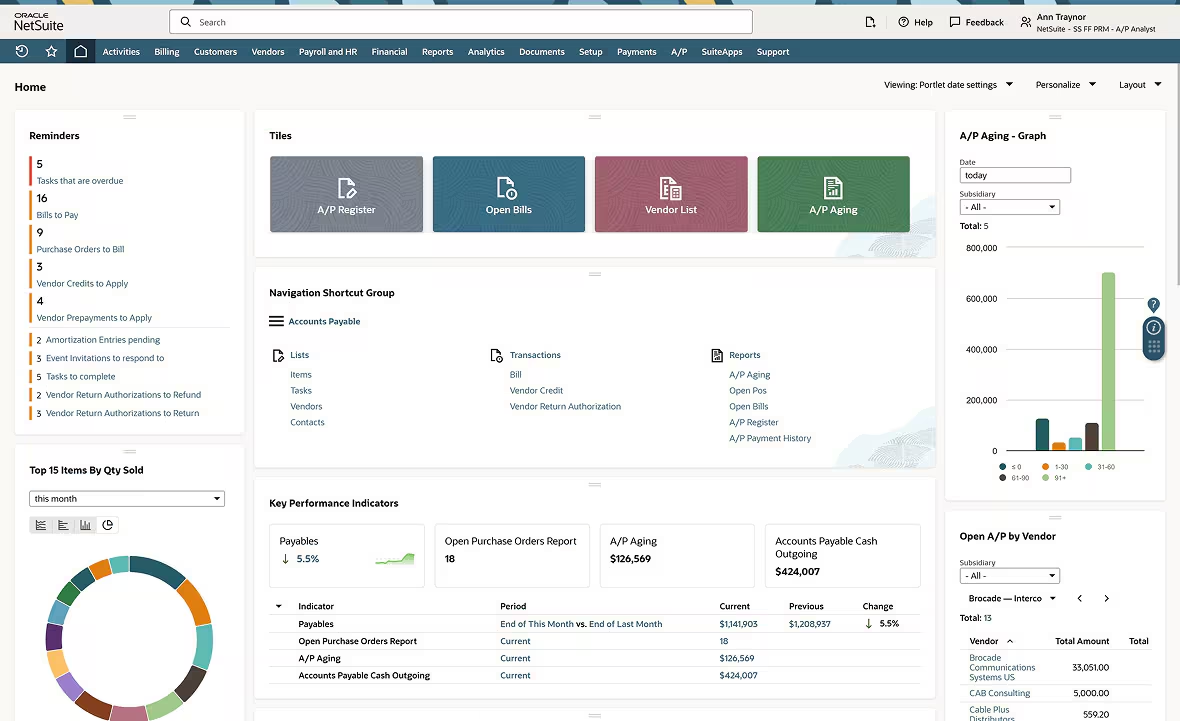
Automating accounts payable using the NetSuite Accounts Payable Automation System automatically processes invoices, routes invoices for approval, and automatically schedules vendor payments from within the NetSuite Enterprise Resource Planning (ERP) system. The automation of accounts payable using this process eliminates the need for manual data entry, accelerates approvals, and provides users with real-time access to view the business’s current state of its cash flow.
The automation of accounts payable in NetSuite provides a practical method for growing businesses to eliminate manual processing of invoices and to automate their workflow to make payments. The automation of the entire invoice-to-payment cycle allows small business owners to gain control of their cash flow again, reduce the amount of manual data entry required to perform the tasks associated with accounts payable, and avoid paying late fees or penalties due to being unable to meet timely payment requirements.
This document guides you through all of the information you will need to know in order to automate AP in NetSuite, whether you have never used the platform before or if you are simply looking to optimize your current configuration of the platform.
What Is NetSuite Accounts Payable Automation?
NetSuite Accounts Payable Automation is the way that organizations use the automated functions of the Oracle NetSuite platform to manage the flow of vendor invoices and payments. In order to do this without manual intervention, automation tools and functions are used to enter, route, and approve all electronic invoices, and to schedule all payments.
Automation captures electronic invoice information, automates the workflow to get the correct people to review and approve the invoices; automates the payment scheduling process; and updates the accounting records (i.e., General Ledger) in real time.
By using automation, small business owners have the ability to spend less time processing invoices and can focus on reviewing financial reports to determine where their money is being spent. By removing the unknown variables of managing accounts payable, automation creates a simple and consistent process for new users.
Why do Small Businesses need AP Automation?
A lot of small business owners think that automated processes are only suitable for big businesses. The opposite is true. Small and growing businesses can actually see greater benefits with automated systems than larger organizations. Because many small business owners have limited employees, each time they spend their time manually processing information (for example, manually entering data into computer programs), they are taking that time away from other important growth opportunities.
Painful IssuesBeforeo Automating Accounts Payable
- Manual Entry Errors: Entering paper-based invoice data into computers results in typographical errors, duplicate payments, and inaccurate payments.
- Long Approval Processes: It takes longer to approve invoices using emails versus traditional methods of signing physical documents.
- Lost Documents: Lost paper-based invoices confuse; lost electronic invoices lose visibility within email inboxes.
- Lack of Visibility: There are no real-time cash flows available when there is no tracking system in place to monitor future payment obligations.
- Damaged Relationships with Vendors: Late payments destroy vendor relationships,s which can result in vendors limiting credit to your company.
NetSuite’s Accounts Payable automation system removes the above challenges by providing a single location where all payable activity occurs.
Key Features of NetSuite Accounts Payable Automation
Identifying what the system does is a good first step toward identifying which features are important to your business. Here are some of the major capabilities.
- Capturing and Extracting Invoice Information
Using NetSuite Accounts Payable Automation, the system can automatically extract invoice data from PDFs and emails, reducing manual entry errors.
Additionally, NetSuite provides a feature called “Recurring Bill” (which will automatically create bills at predetermined intervals) for regular invoices such as monthly software subscription or utility payments.
- Automatic Approval Process
All invoices do not require the same level of verification. NetSuite’s automated workflow tool enables users to establish rules for approval based upon thresholds (e.g., dollar amount, vendor, department).
Automated workflow examples include:
- Low-value invoices ($X.XX) go directly to payment.
- High-value invoices require manager or owner approval.
- Purchase order match ensures that invoices only pay for goods and/or services received.
Once an invoice has been submitted to the workflow process, the approver(s) will receive notification via email or through the NetSuite platform. The approver may access the invoice and either reject or approve it from anywhere without having to log in to another system.
- Vendor Portal
The vendor portal in NetSuite enables suppliers to send invoices electronically, obtain payment status, and update their vendor information. This eliminates the need for vendors to communicate with your company via email, providing them with visibility into when they will be paid. - Payment Processing and Scheduling
Once an invoice has been approved, you can schedule payments based on the due date or if you qualify for an early payment discount opportunity. NetSuite provides several payment options:
- Electronic payments (e.g., ACH, wire transfer)
- Credit card payments
- Paper checks (printed and mailed)
Additionally, the system generates positive pay files for your bank, minimizing the risks associated with check fraud.
- Real-time View of Your Company’s Financial Position
Since all invoices and payments are synced with your general ledger in real-time, your cash flow reports and balance sheet are always up-to-date. Additionally, you can quickly produce aging reports, identify future payment obligations, and analyze your company’s spending by vendor or category. - 1099 Processing and Compliance
If your U.S.-based business pays independent contractors, NetSuite makes it easy to handle 1099 processing and compliance. The system captures all payments made to independent contractors, applies the proper 1099 form, and generates the required filing documents.
How NetSuite AP Automation Works: Step by Step
Automated payables can seem overwhelming if you’ve never used automation before. Below is an explanation of the most common steps that occur after the invoice arrives until the final reconciliation.
Step 1: Receive Invoice
The invoice will arrive either via e-mail, uploaded through the vendor portal, or scan paper invoice. This is the first step in which the paper or digital invoice document is entered into your AP (Accounts Payable) system.
Step 2: Extract Invoice Data
NetSuite extracts data from the invoice, such as vendor name, date, invoice number, line item detail, and dollar amount, and inserts it into the corresponding system field(s). Using this method of extraction eliminates the need for manual entry and the resulting errors associated with that.
Step 3: Validate Invoice (PO Match)
Validate whether the invoice matches one or multiple PO’s (Purchase Orders) and/or receiving documents. Confirm that the quantity billed by the vendor matches the quantity ordered and received. Identify and flag any discrepancies immediately to prevent overpayment.
Step 4: Approval Process
Define rules for who receives automatic routing of invoices based on the amount of the invoice, type of vendor, etc. Small routine invoices may receive automatic approval, while higher-value invoices and invoices from new vendors may require manager or owner approval. Approval personnel can review comments made or simply approve the invoice with one-click approval.
Step 5: Schedule Payment
Once invoices have been approved, they will be placed into a queue for payment based on the due date established when the invoice was created. Display a list of upcoming payment obligations that provide opportunities for early payment discounts to assist in optimizing cash flow.
Step 6: Execute Payment
Create payment files for your bank to initiate the payment transaction. Generate check prints for checks, or execute electronic payments (e.g., ACH, wire transfers), while simultaneously updating vendor balance information within the system.
Step 7: Reconcile
Upon confirmation of receipt of the transaction from your bank, NetSuite will reconcile the payment to the statement received from your bank. Minimize manual work involved in matching records and ensure your books are always current and accurate.
NetSuite AP Automation vs Manual Accounts Payable
Still unsure if a move to automate makes sense for your business? Below is a comparison of both methods in real-time.
| Factor | Manual AP | NetSuite AP Automation |
| Data Entry | Hand-typed, error-prone | OCR capture, minimal errors |
| Approval Time | Days or weeks (email chains) | Hours or same-day (automated routing) |
| Invoice Storage | Paper files or scattered folders | Centralized digital repository |
| Payment Visibility | Check registers, spreadsheets | Real-time dashboard |
| Duplicate Payment Risk | High | Low (system flags duplicates) |
| Audit Trail | Difficult to reconstruct | Complete digital history |
| Scalability | Breaks under volume | Handles growth easily |
Example of a Real-World Scenario: An agency that was manually processing 120 invoices each month was able to reduce its invoice payment time frame (the time it takes for the money to be paid) from 15 days down to 4 days when it implemented an Accounts Payable Automation Solution through NetSuite. As a result, the company’s finance department can spend its Fridays analyzing and developing the company’s financial strategy rather than inputting each line of an invoice into its accounting system.
Top Benefits of Automating Accounts Payable in NetSuite
As important as saving time is, implementing automated accounts payable (AP) offers many more tangible benefits to small business owners.
Reduced Labor or Processing Costs
Manual invoicing can be expensive in terms of labor and postage; plus, if an invoice is late, there may be additional fees. In comparison, the cost of processing an invoice through automation is dramatically less than the cost of processing it manually.
Fewer Errors or Duplicate Payment Issues
Typing invoice numbers and dollar amounts into a computer creates an opportunity for errors to occur. Automated AP removes the opportunity for human error and provides a mechanism to identify duplicate payments prior to payment.
Vendor Relationships Improve
Paying bills on time or early builds trust with vendors. When you have a strong reputation for paying your bills promptly, vendors will often provide you with better terms for your purchases. Also, having a portal for your vendors to log in and see their own information can greatly improve communication.
Cash Flow Planning Improves
Knowing exactly how much is owed and when due allows you to plan your cash flow. With real-time visibility into what is owed and when due, you can keep cash in reserve when you want to and take advantage of early payment discounts when possible.
Audit Preparedness
Automated AP solutions create a complete paper trail for each step of the AP process. All approvers, times of approval, and any changes made are recorded. This makes preparing for audits easier and faster.
Scalability
As your company expands, so does the number of invoices received each month. Manual AP processes will quickly become unmanageable as the number of invoices increases. An automated AP solution is scalable and will grow along with your company, handling higher volumes of invoices without requiring an increase in personnel.
KPIs to Track After AP Automation Implementation
Measuring your Accounts Payable automation success with the right KPIs will allow you to identify where you can make improvements, as well as where you have been successful in achieving your goals.
- Processing Time (Days): From when you receive an Invoice to when it is approved for Payment
- Cost Per Invoice: The total cost of your Accounts Payable function divided by the total number of Invoices processed during a given period.
- Approval Cycle Time: The average amount of time Invoices are in the Approval Process.
- Duplicate Payment Rate: The number of Duplicate Payments made per Quarter.
- Discount Capture Rate (Early Payment Discount): As a percentage of the early payment discount available to your company, how much of that discount was actually captured?
- Exception Rate: As a percentage of Invoices received, what percentage required Manual Intervention?
In most cases, after 3 months of AP Automation, most companies see their Processing Times reduce by 50-70%.
Common Challenges and How to Overcome Them
Most implementations of software will experience some level of resistance. Listed below are potential areas of resistance you may encounter when implementing NetSuite’s Accounts Payable (AP) Automation, and suggestions on how to resolve those areas of resistance.
Vendor Adoption
There may be vendors who do not want to use a portal to submit their invoices electronically. The vendors may prefer to send paper or electronic copies via email.
Resolution: Use your larger vendors as a starting point and show them the benefits of utilizing the portal. Benefits include faster payment, the ability to see the status of their invoice, and fewer emails asking about the status of their invoice. With smaller vendors, continue to accept emailed invoices and have NetSuite capture the data.
Setup Complexities
Setting up approval processes and defining the rules for matching invoices to purchase orders, etc., requires a considerable amount of planning and setup before implementation. If you create your rules too tightly, legitimate invoices may be held up in the system.
Resolution: Create basic approval processes and then evolve the process as you gain knowledge and understanding of the workflow. Approval rules can be changed at anytime after the initial setup. It is beneficial to involve all key stakeholders during the setup phase to ensure the workflow created matches the way the company currently operates.
Interoperability Issues with Current Software Systems
If you currently utilize other software systems (i.e., purchasing system, expense reporting system), you will need to integrate these systems with NetSuite.
Resolution: NetSuite has integrated capabilities with the most commonly utilized software systems. Engage an implementation partner or NetSuite consultant to assist in the integration and ensure seamless data flow between the various systems.
Data Clean Up Before Migrating Data into NetSuite
If you are migrating from spreadsheets or older software systems, there may be issues with your vendor list(s) and/or open payable(s), which may require cleanup before implementing the automated system.
Resolution: Allow sufficient time to review and normalize vendor information before “go-live”. Closeout old, duplicate, or inactive vendor records to provide a cleaner vendor list and reduce the risk of errors within the automated system from the beginning.
NetSuite AP Automation Pricing Overview
The prices for NetSuite accounts payable automation vary greatly depending on how large your business is, as well as the number of transactions that occur monthly. The specific NetSuite modules chosen will also affect pricing.
Typical NetSuite Pricing:
- Base NetSuite License: Every user must have this license (dependent upon the version of NetSuite)
- AP Automation Module: There is an additional charge based on the number of invoices processed
- SuiteApps (Third-Party Tools): Separate Subscription Fees
Small Business Typically Pay Between $500-$2000 Per Month for Full AP Automation Capabilities Including Base Access to NetSuite.
Implementation Fees Are Usually $5,000-$15,000 Depending On How Complex Your Implementation Is.
To Get Exact Pricing For Your Needs, Contact NetSuite Directly Or Meet With A Certified Implementation Partner; Many Provide Free Consultations To Help Determine Which Services Will Meet Your Needs.
Best NetSuite AP Automation Tools and SuiteApps
NetSuite’s native AP features work well for many businesses, but third-party SuiteApps can add specialized functionality. Here are popular options:
| Tool | Best For | Key Feature |
| Tipalti | High-volume AP | Global payment processing, tax compliance |
| Stampli | Collaborative approval | Conversational AP, direct communication with vendors |
| AvidXchange | Mid-market | Invoice automation, payment processing |
| MineralTree | Small business | Bank-grade security, simple integration |
| Beanworks | Multi-entity | Centralized AP for multiple subsidiaries |
These tools integrate directly with NetSuite, so invoice data flows seamlessly between systems.
Is NetSuite AP Automation Right for Your Business?
Most businesses can benefit from automation; however, it is a good idea to check your readiness for automation.
You Will Benefit From Automation If:
- You are processing more than fifty invoices per month.
- You experience approval delays that prevent the timely approval of invoices.
- You are making duplicate payments or missing out on early payment incentives due to disorganization with the payment of invoices.
- You are unable to track the status of your accounts payable in real time.
- You spend an excessive amount of time per week performing manual data entry.You May Not Be Ready For Automation If:
- The number of invoices you are processing monthly is extremely low (less than ten).
- You are in the beginning stages of a start-up and have yet to develop processes.
- You do not have support from key personnel.
Although you may be a small company, you should also think about your future potential for growth. If you set up automation systems now, you will avoid many issues related to growth in the future.
Step-by-Step Guide to Implement NetSuite AP Automation
Here is a general outline that will help guide your next steps.
Step 1: Understand where you are now.
Map how invoices currently go through your organization. Where do they originate? Who touches them at various points? What are the areas where delays occur? Knowing this will help you create a process that is best suited for your business.
Step 2: Determine what your needs are.
What are the top three items on your wish list? Do you require multi-currency support? Do you want purchase order matching? Do you have requirements for 1099 processing? Write down everything you want/need before looking into solutions.
Step 3: Look into NetSuite AP Automation modules.
NetSuite has several options available for AP automation, ranging from simple bill management to sophisticated invoice processing via SuiteApps. Your NetSuite Account Manager or Implementation Partner should be able to provide information on the available options.
Step 4: Develop an Implementation plan.
Work with a Consultant (or Internal Team) to establish Vendor Records, Chart of Accounts Mapping, Approval Rules, and Payment Options. Allow sufficient time for testing before going live.
Step 5: Educate your Team.
The employees responsible for Approvals, AP Staff, and all others who will be using the new process will only get value out of the process if they understand it. Take the time to train them so they know how the system can make their work more efficient.
Step 6: Monitor & Optimize.
Post-Launch, evaluate how the process is working. Are Invoices getting hhung upin the process? Is there a delay in Approvals? Make adjustments to the Workflows as necessary.
Frequently Asked Questions
Does NetSuite AP Automation Work for International Businesses?
NetSuite has supported international businesses; however, it has been utilized by companies throughout the world. Although NetSuite does support multiple currencies, tax codes, and payment options, the 1099 process is limited to the United States; however, the majority of countries have a reporting feature as well.
Is There a Way in NetSuite to Automatically Take Advantage of Early Payment Discounts?
You are able to establish discount terms per vendor; this way, NetSuite will automatically determine what discount is available and apply it to the recommended payment date.
What If An Invoice Does Not Match My Purchase Order?
In the event that an invoice does not match a purchase order, the system will flag this discrepancy and route it to be reviewed. At this point, you may either approve it despite the discrepancy or send it back to the vendor to correct.
Do I Need To Be A NetSuite Expert To Use AP Automation?
No, the user interface for NetSuite AP Automation is very easy to understand and utilize. If you can click “yes” to approve an email, then you should be able to approve an invoice in NetSuite. While the setup of AP Automation does require some technical knowledge, the use of AP Automation is very simple.
Is NetSuite Secure Enough for Payment Processing?
NetSuite utilizes bank-level encryption and follows all applicable industry security guidelines. Additionally, you can link your banking information directly to NetSuite or utilize NetSuite’s payment processing services. Positive Pay Files also provide additional layers of security against fraudulent transactions.
Typically, What Is The Return On Investment (ROI) For AP Automation?
Most businesses realize an ROI from utilizing AP Automation in 12-18 months via the reduction in time spent manually processing invoices and/or capturing early payment discounts and/or reducing/eliminating late fees. A company processing 100 invoices per month would save 20-30 hours of manual time processing invoices per week.
My Final Thoughts
NetSuite Accounts Payable Automation turns a back-office administrative task into a fast, efficient, and strategic process. For small business owners, this translates into less time spent performing data entry and more time focused on managing cash flow, building relationships with vendors, and making well-informed purchasing decisions.
The transition from manual processes to an automated system does take some time; however, the benefits of such a transition are very tangible. A reduction in errors. A faster approval process. Cleaner financial records. And the confidence that you know at all times what you owe to whom and when you owe it.
If your business has grown beyond using spreadsheets and/or using email as a method to obtain approval for payments made, consider evaluating NetSuite’s AP automation solutions as a viable “next step.” Begin by documenting your current process, identifying the largest areas of inefficiency/pain, and then begin to implement improvements in those areas. The ultimate goal is not to create perfection on Day One; rather, it is to implement a system that will work for your business – not against it.
NetSuite’s Accounts Payable (AP) automation turns an administrative task in the back office into a fast, efficient, and strategic function. Schedule a 30-minute consultative session with a NetSuite AP Automation Specialist to explore how your small business can automate invoice processing and improve its cash flow.
If you want to automate more than just invoices, explore our guide on the best process automation tools for small businesses.