

Be honest with yourself; running a small business today (2026) is an exercise in managing more data than you’ve ever managed before. Sales numbers, customer reviews, website visitors, social media engagement, and inventory levels. It can add up fast. This is where AI Analytics Tools help small businesses make sense of their data and make better decisions. If you are like every other business owner out there, I’m sure you have several different spreadsheet files lying around your desk, each one providing some type of clue as to how to grow your business.
There is great news here. While this may seem overwhelming, you do not have to have a degree in Data Science or a six-figure budget to begin making sense of it.
AI Analytics Tools have become much more accessible over the last few years. What once took a team of experienced data analysts and large amounts of money for licenses to use expensive software packages has now been made available to everyone who has a laptop and wants to learn. The best part of these tools is that they were developed to function the same way as you. They answer questions using simple language, identify trends automatically, and can be incorporated into your current workflow.
What Are AI Analytics Tools for Small Businesses?
AI Analytics Tools – Using Artificial Intelligence To Analyze Business Data For Smaller Businesses. AI analytics tools are a type of computer-based platform that is designed to automatically find trends in your business’s data and provide you with key insights from that information. Small businesses can quickly make better decisions using AI analytics tools than they would have been able to do on their own. Traditional reporting tools just tell you what happened; AI analytics tools explain why something happened and what might happen as a result.
Benefits of Using AI Analytics Tools for Small Businesses
Automate routine manual tasks of collecting and reporting data to save you time to run your business.
Use the results of the automated reporting and analysis tools to make better decisions with confidence rather than using a “best guess” approach.
Be able to identify new opportunities for your business by analyzing trends and patterns in your data that may have gone undetected when reviewing raw numbers.
Eliminate the potential for error that occurs with manual entry and calculation; let the AI handle the data cleaning and calculation to give you better quality insight.
Have access to affordable and powerful analysis capabilities similar to those used by larger businessesthato hire expensive data analysts.
How We Selected These Tools
It’s helpful to know how to assess whether an analytics tool will be helpful for your small business before looking at the options below. We reviewed over two dozen analytics tools and spoke to many business owners who are using these tools every day.
We looked at five specific factors as follows:
- Ease of Use: Do you have meaningful results within the first hour of using the tool?
- Cost: Is the cost transparent and reasonable for your small business budget, and does it provide a free tier?
- Integration: Does it integrate with other tools you are currently using (i.e., spreadsheets, CRM, etc.)?
- Output: Does it deliver practical insights you can use to make decisions or take action, rather than simply producing charts and graphs?
- Data Privacy: Are there clear policies around how your data is being used and protected?
Using the above framework to guide us, here is our assessment of the best current AI data analysis tools.
Top AI Analytics Tools for Small Businesses in 2026
1. Sourcetable – Best for Spreadsheet Users
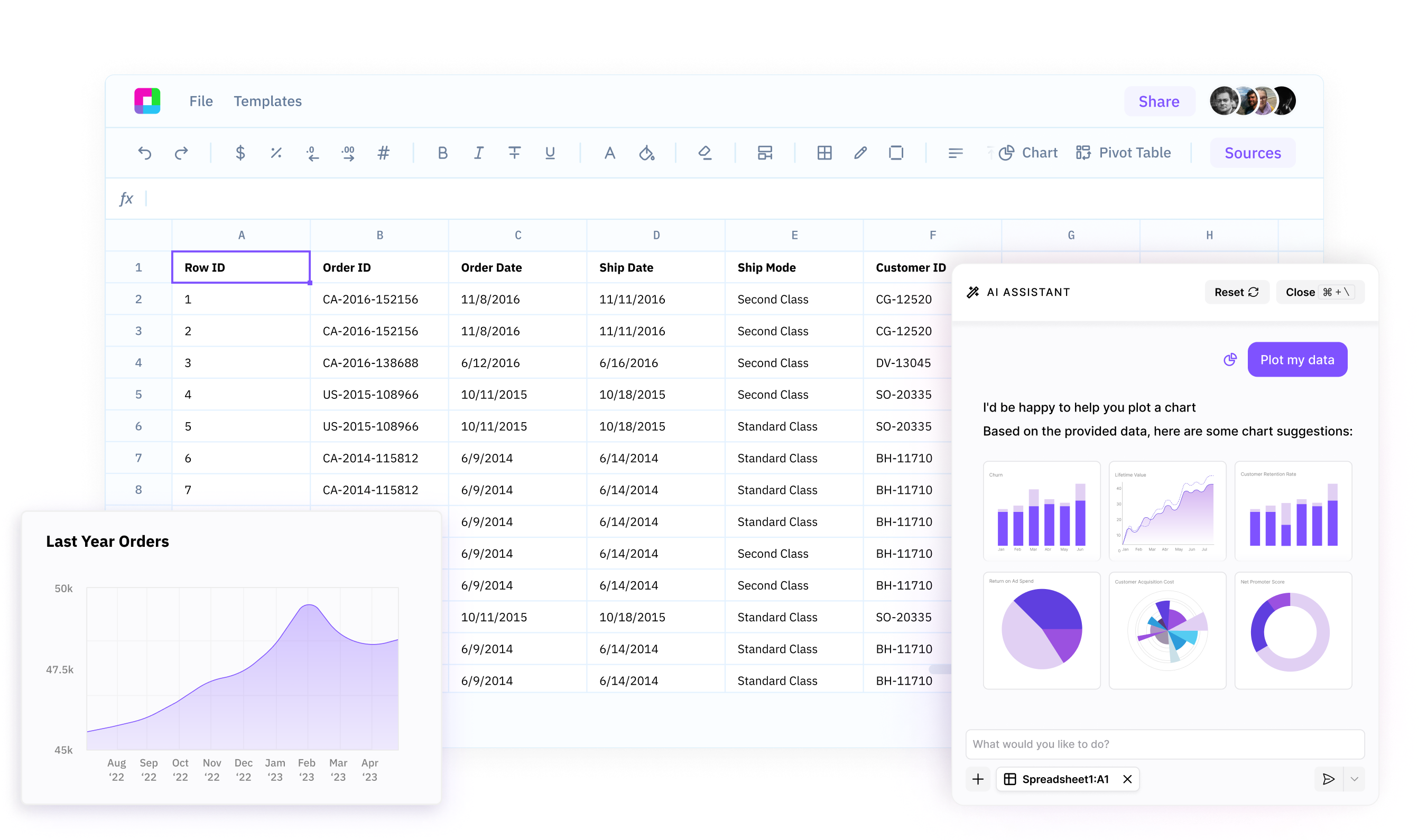
Sourcetable is one of the easiest AI Analytics Tools for businesses that rely on spreadsheets (most businesses use spreadsheets). So if you’re looking to try a new tool, you might find value in checking out Sourcetable.
What it Does: Sourcetable is an artificial intelligence-based data analyst that lives inside your spreadsheet. Ask a question about your data in plain English (“What were my top-selling products last quarter?” or “How have my sales been trending by region?”) and receive an answer immediately. Additionally, Sourcetable will clean up your data, generate formulas for you, and provide automated insight into your data. This is all done without writing a single line of code.
Who it Is For: Teams of small size who are comfortable working within a spreadsheet environment, but would like some artificial intelligence assistance, without having to learn how to use another program. A solo entrepreneur trying to manage many different data sets may also be well-suited for this application.
Pricing: Pricing starts at $20/month. There is also a free version available to allow users to test some of the core functionality.
Best for Beginners: Sourcetable has the lowest barrier to entry for teams that are native to working within a spreadsheet environment.
Pros:
- The interface is the same as what you see in Excel or Google Sheets.
- Natural Language Queries will start returning results immediately.
- No technical experience is necessary to begin using Sourcetable.
Cons: Source Table is best used by those who are already comfortable using spreadsheets.
- Advanced Visualizations are not nearly as robust as they are in a Business Intelligence Tool.
2. Microsoft Power BI Best for Microsoft Ecosystem Users
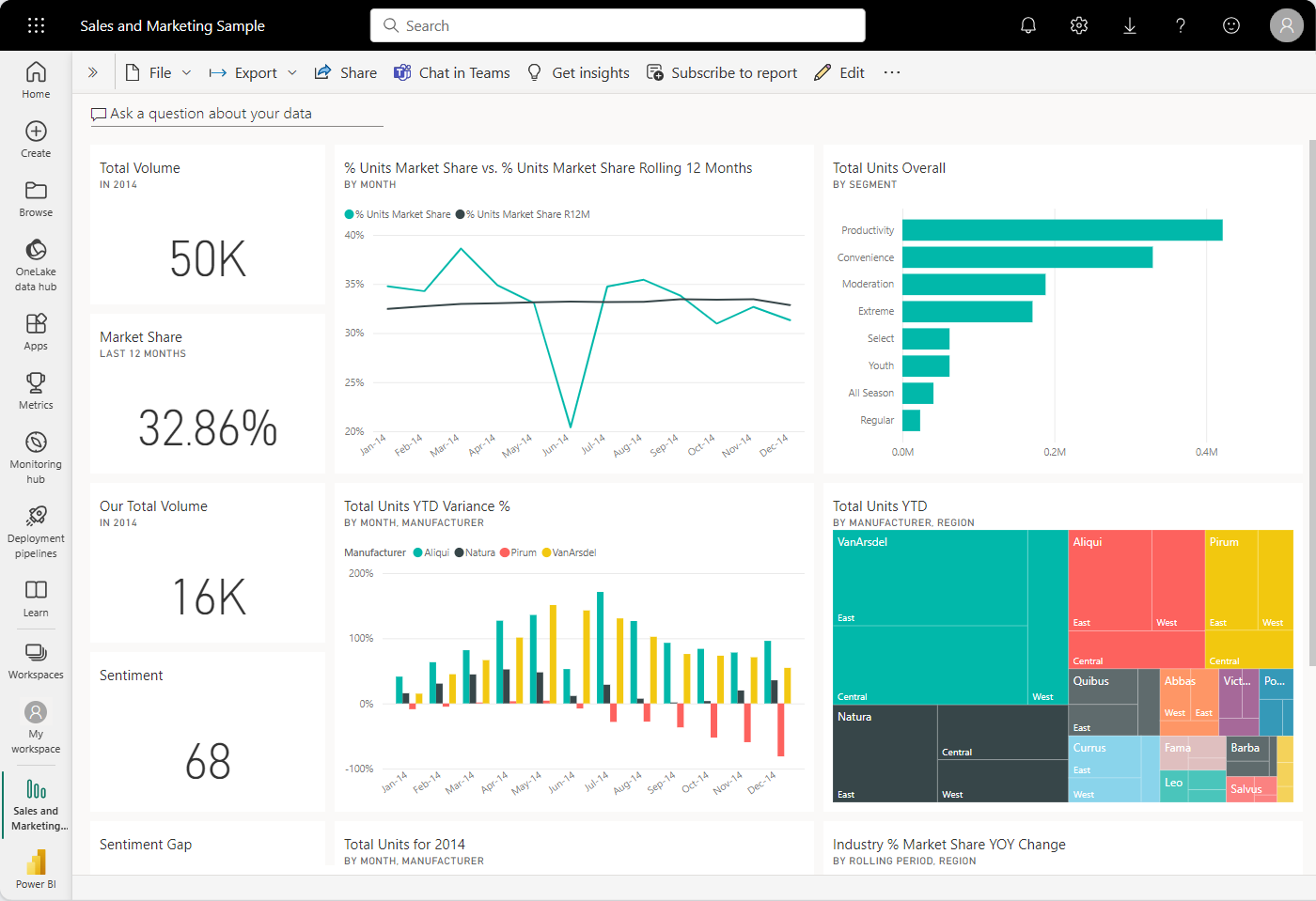 Microsoft Power BI is now an even better choice for small businesses with the inclusion of Artificial Intelligence (AI) technology within the 2026 edition. Microsoft is a trusted name in the business world, so the inclusion of AI will enhance its ability to assist small businesses.
What it does: The program can connect to many different types of Data Sources (such as Excel Spreadsheets, Accounting Software, Customer Relationship Management (CRM) Systems, Social Media, etc.) and allow you to create Interactive Dashboards. It also uses artificial intelligence to provide answers through natural language question/answer (for example, “Show me sales by product category”) and also detects patterns and provides Predictive Forecasting automatically.
Who it’s for: Small Businesses who are currently using Microsoft 365 or Azure. If your company currently utilizes Teams, Outlook, and Excel, then Power BI will integrate seamlessly into those applications.
Pricing: Pricing begins at $10 per User, per Month. This makes Power BI one of the least expensive Enterprise-Grade options available.
Pros:
- Deep Integration with Microsoft Ecosystem
- Strong Security and Compliance Features
- Scales as you grow
Cons:
- Can be Overwhelming at First
- Some Advanced Features have a Learning Curve
3. Energent.ai Best for Accuracy and Automation
When you are using data to make business decisions,s accuracy is very important. This is why Energent.ai has built itself into one of the most accurate AI analytical solutions in the market, having scored 94.4% on independent benchmarks.
How it works: Unlike many of the other analytical tool solutions that provide conversation-style interaction with your data, Energent.ai is an autonomous analyst. Simply upload messy spreadsheets, PDFs, or even scanned documents, and Energent.ai will clean, organize, and analyze all of your data automatically. Once completed, Energent.ai will also generate presentation-ready visualization and insights – no manual work needed.
Who it is for: Small business owners, entrepreneurs, and decision makers who require dependable analysis of their data and do not want to spend hours cleaning and organizing the data before they can get started. Specifically designed for the financial services industry, operations departments, and healthcare services.
Cost: The cost of using Energent.ai varies depending on the requirements of the user and is provided at the time of contracting. A free trial is available.
Pros:
- Most accurate solution available (94.4% on benchmarks)
- Most data formats (spreadsheets, PDFs, etc.) are easily cleaned and organized by Energent.ai
- AI produces final deliverable products (slideshow, report)
Cons:
- Advanced workflow capabilities have a slight learning curve
- Enterprise-level pricing options may be above the budget of micro-businesses
4. Tableau with Pulse – Best for Visual Storytelling
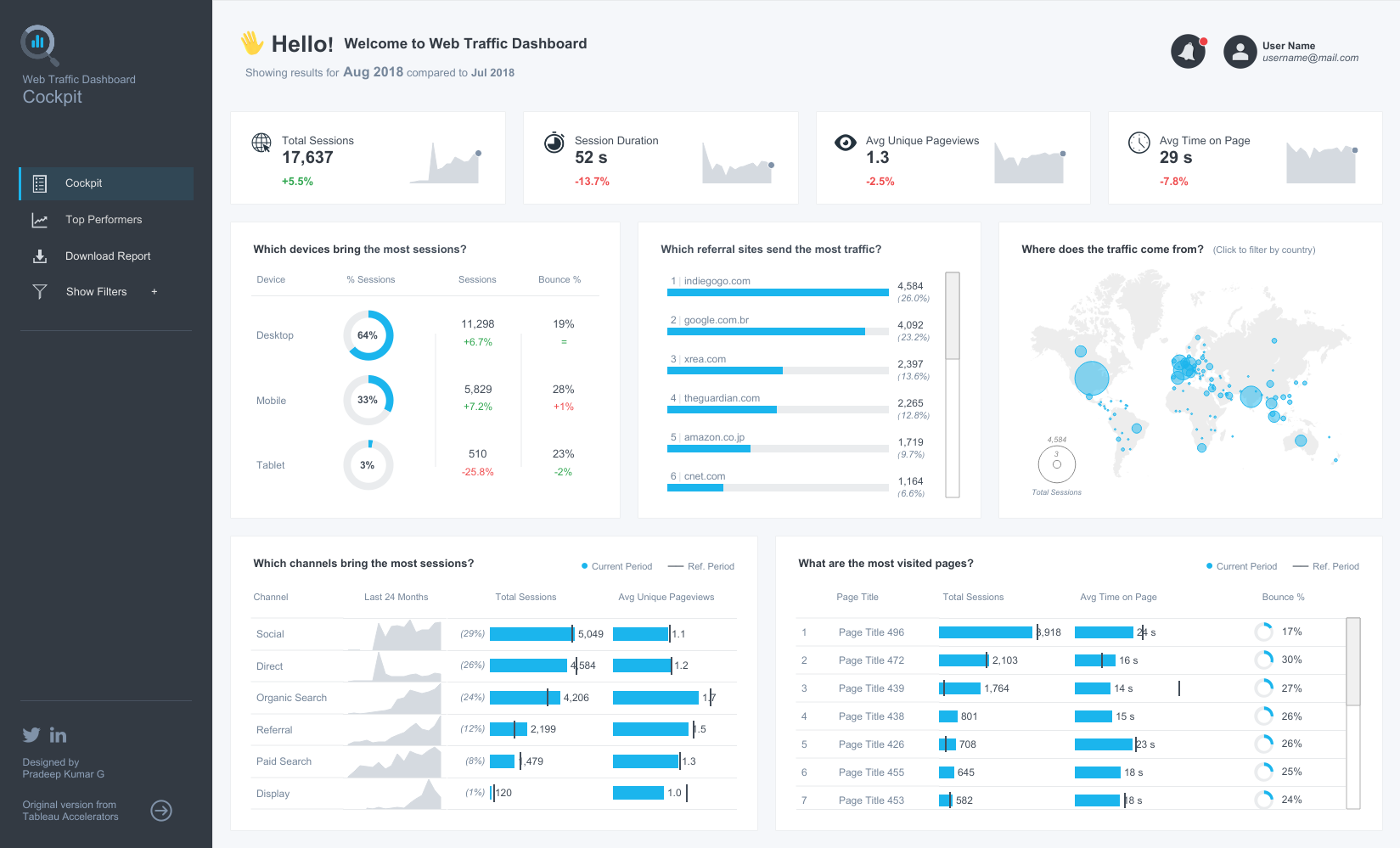
Tableau has historically been considered the top data visualization tool, and its upcoming AI capabilities will make it even more valuable for small teams. It is owned by Salesforce, so it brings enterprise-level credibility to small business analytics.
Tableau Pulse: What it Does
Tableau Pulse is an AI layer that provides automated trend identification and provides an explanation of those trends using plain language. Rather than creating custom dashboards from a blank slate, Tableau Pulse identifies trending topics and issues with your data, such as a spike in customer churn or an unplanned decrease in sales.
Businesses that are highly dependent on visuals to gain insight into their data and also to communicate with their stakeholders. Marketing Agencies, Consultants, and Product Teams tend to really like Tableau.
Tableau Pricing: Tableau pricing starts at $70/month/user. This price point is high-end; however, for heavy users, this is justified.
Pros:
- Interactive Visuals, beautiful
- Automated Explanation of Insights provided through AI
- Strong Community and Learning Resources
Cons:
- Higher priced than other options
- Too much for simple reporting
5. Zoho Analytics Best All-in-One Value
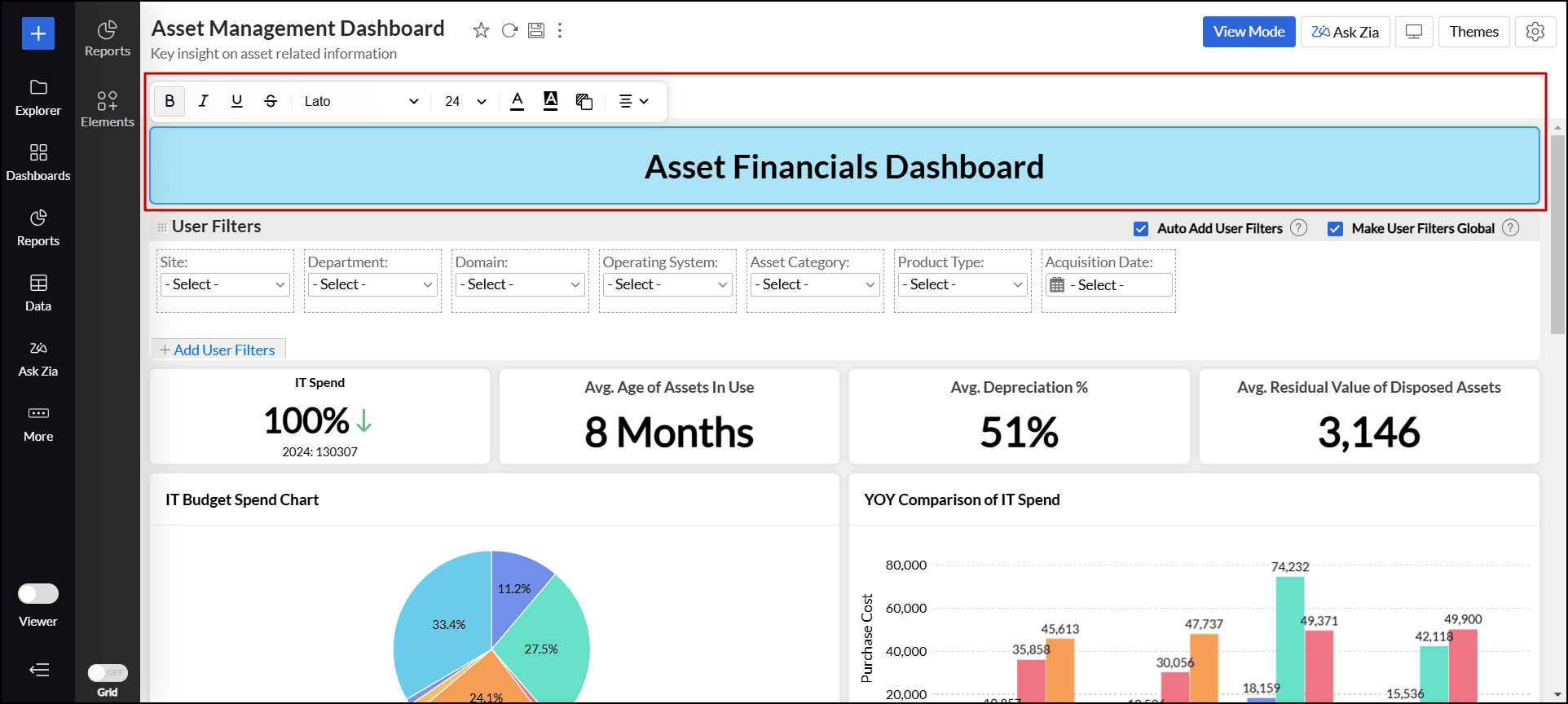
Zoho Analytics is part of a large ecosystem of business applications; the company’s analytical tool packs more punch as an analytics application compared to its size and the number of businesses it supports. The platform also provides reliability while still being cost-effective.
What it does: Zoho Analytics can connect to over 250 different types of data sources (including those from Zoho’s product suite, in addition to many of their competitor’s suites, such as Salesforce and Google Workspace) to provide reporting capabilities. Zoho Analytics also includes Zia, which allows users to ask natural language questions about their data, and then Zia will predict trends for users to analyze. Zia also uses artificial intelligence to recommend reports to users based on patterns in user data.
Who it’s for: This product would be ideal for small businesses looking for a budget-friendly option to provide them with the ability to track, report, and forecast. It is particularly useful if the small business uses Zoho’s CRM or accounting products.
Pricing: Pricing begins at $24 per month for up to 2 users and provides very generous limits for how much data can be uploaded by each user.
Best overall value: Based on the number of features offered for the price, Zoho Analytics is the best overall value.
Pros:
- Excellent Value for Money
- A large number of data sources are available for integration
- More than expected capabilities by AI and Zia
Cons:
- Less polished interface compared to higher-priced tools
- Many of the more complex capabilities will need training
6. Google Looker Studio – Best Free Option
Formerly called Google Data Studio, Google Looker Studio is one of the top AI Analytics Tools and still one of the most reliable (and free) analytics software solutions on the market today. As a product of Google, it has the same level of dependability as its parent company and seamlessly integrates with all the Google products (Google Analytics, Google Ads, Google Search Console, Google Sheets, etc.) as well as hundreds of other data source types via “connectors”.
How it works: The user simply needs to connect their Google apps (or other supported data source type), and they can create custom dashboards that will auto-refresh when new data becomes available. Additionally, the AI in Looker Studio provides some assistance with exploratory analysis and provides “smart” alert notifications for the user.
Who this is good for: This is an excellent solution for budget-conscious companies that are already utilizing Google Apps. It is particularly useful for creating simple marketing reports, website analytics reports, and/or basic operational dashboards.
Cost: Free. There are also enterprise pricing options available.
The Best Free Solution: For those looking for powerful analytics at no cost, Looker Studio is a top choice.
Pros:
- Completely FREE for all core features.
- Provides deep integration with all Google products.
- Offers a large number of pre-made templates.
Cons:
- Limited ability to integrate data from outside of Google products.
- Less advanced AI capabilities compared to many of the paid alternatives.
7. ThoughtSpot Best for Natural Language Search
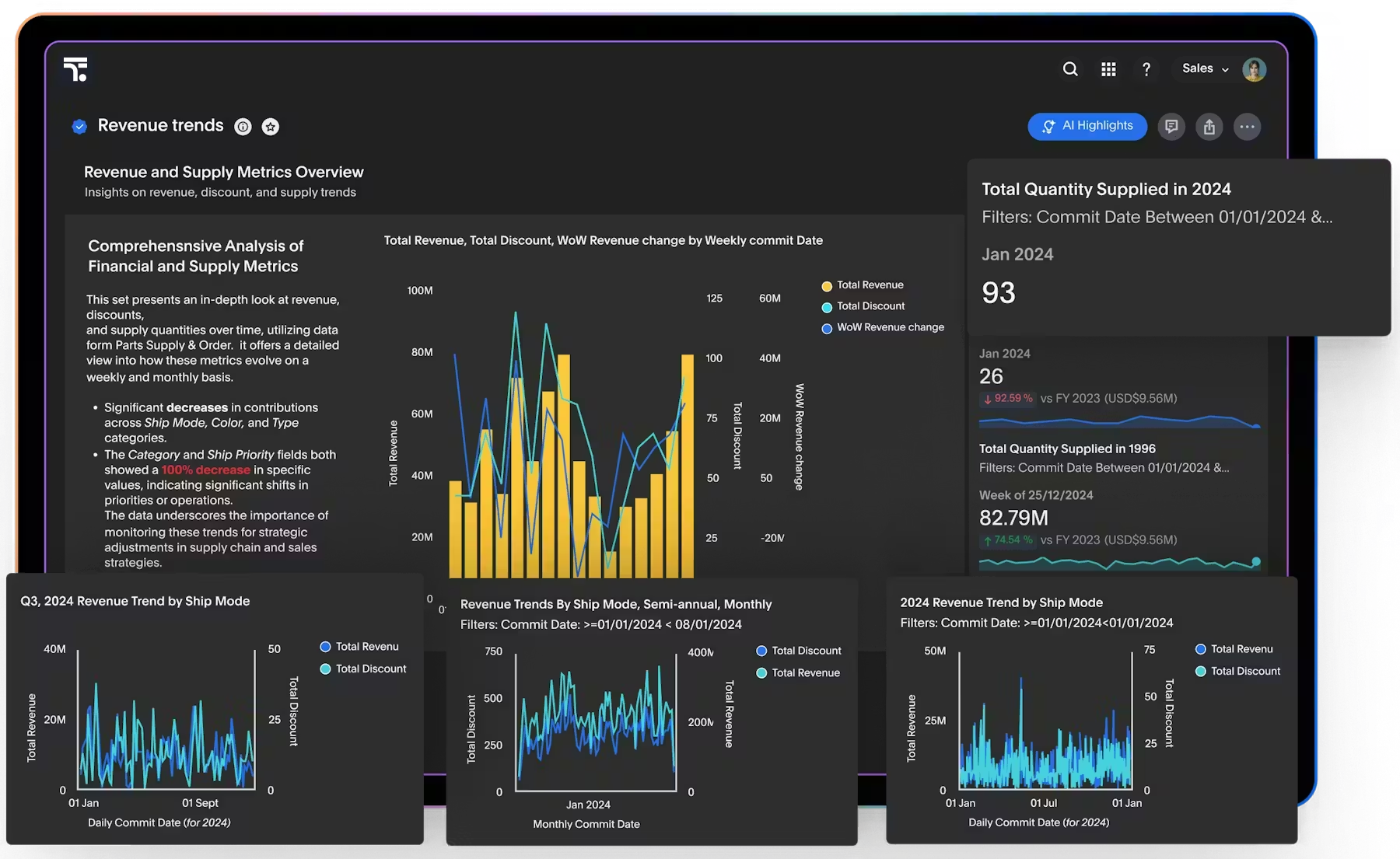
ThoughtSpot is an AI Analytics Tool that started the “search-driven analytics” movement and now has a better tool for small business use.
How It Works: ThoughtSpot allows anyone in your organization to search data and receive instant answers. “How many new customers have we acquired this past month?” “What is our average sales by region?” The artificial intelligence (AI) will understand the context of what you are asking and deliver results without having to build a pre-defined dashboard.
Who Is This For: Non-technical employees who need access to data insights regularly. Examples include: Sales Teams, Customer Service Managers, Operations Leads.
Pricing: Pricing starts at $95/month, which positions ThoughtSpot as a high-end solution.
Pros:
- Truly easy to use Natural Language Interface.
- Works with all types of data.
- Strong Mobile Experience.
Cons:
- High cost.
- Some capabilities require setup by data-savvy users.
8. Akkio – Best for Predictions

Akkio is focused primarily on assisting smaller businesses in predicting their future outcomes. Examples of this include identifying customers that are most likely to churn, predicting which leads will convert, and determining what product/service level will be sufficient.
What it does: First, upload your existing data. Then, specify what type of prediction you would like Akkio to generate. Akkio then automatically creates a machine-learning model. The user requires no programming or data science knowledge to use Akkio. In just minutes, users receive the ability to take action based on their generated predictions.
Who it’s for: Marketing/Operations Teams who wish to have the ability to generate predictions without having to hire Data Scientists.
Pricing: Pricing is customized based on usage; a free trial is available. You can start with a free trial to determine if Akkio will fit into your workflow.
Pros:
- No-code predictive modeling
- Fast set-up and results
- Integration with Google Sheets and Salesforce
Cons:
- Narrow focus (only provides predictions)
- Accuracy varies by data quality
Quick Comparison of Best AI Analytics Tools (2026)
| Tool | Best For | Starting Price | Key AI Feature |
| Sourcetable | Spreadsheet users | $20/month | Natural language queries in a spreadsheet |
| Microsoft Power BI | Microsoft users | $10/user/month | AI visuals and Q&A |
| Energent.ai | High accuracy needs | Custom | Autonomous analysis, 94.4% accuracy |
| Tableau (Salesforce) | Visual storytelling | $70/user/month | Pulse automated insights |
| Zoho Analytics | All-in-one value | $24/month | Zia AI assistant |
| Google Looker Studio | Budget-conscious | Free | Smart alerts and exploration |
| ThoughtSpot | Natural language search | $95/month | Search-driven analytics |
| Akkio | Predictions | Custom | No-code forecasting |
Real Use Cases of AI Analytics Tools
E-Commerce: Determine Top Selling Items
Automatic identification of top-selling items, poor-performing categories, and when inventory should be restocked is all possible with AI analysis tools that connect directly to sales data and inventory systems. (Examples include: Sourcetable and Microsoft Power BI.)
Marketing: Identify Most Cost-Effective Marketing Channels
No longer will you need to guess which of your marketing channels is creating customer traffic. AI tools assess performance from each channel, determine where each sale originated, and show you where to place a portion of your marketing budget. Google’s Looker Studio works very well as a tool for existing Google-based marketing teams.
Financial Reporting: Predict Revenue More Accurately
Tools such as Akkio enable small business owners to use predictive analytics to create forecasts of their revenue streams, to identify seasonal trends,s and prepare for times when money may be tighter than usual. With better financial reporting comes fewer surprises and more informed investment choices.
Customer Insights: Analyze Customer Behavior
What do your most loyal and repeat-buying customers have in common? AI reporting tools enable you to divide up your customers into groups by behavior, identify potential “at-risk” customers before they leave, and provide additional purchase opportunities that you may miss with manual processes.
How to Choose the Right AI Analytics Tool
Choosing one (from all of those) can be a daunting experience. Here is a basic approach to help you narrow down your choices:
Start with the issue, not the tool: What is the single question you wish you could get an immediate answer for related to your business?
Maybe it is something as simple as “Why did sales decline last month?” or “What marketing channels are producing the most paying customers?”
The best Business Intelligence software for you is the one that provides the quickest solution to your top question.
Consider where your staff is comfortable: If your staff is used to working with Spreadsheets, choose a Spreadsheet Native BI Tool like Sourcetable. If your staff is familiar with Google Tools, then Google Looker Studio would make the most sense. Most of the time, when staff are forced to learn how to do things differently from what they have been doing previously, they end up abandoning the software.
Verify integrations: You should check to see if the Data Analytics Platform you are considering integrates with other applications you currently utilize – i.e., CRM, Accounting Software, Email Platform, rm etc. The more data exports required, the quicker the task becomes a chore.
Try before buying: Almost every tool on the list offers a Free Trial or Free Tier. Spend at least an hour trying out two or three options. Which option seems easier to use? Which option provides the most useful information the fastest? Listen to your instincts.
Real Talk: What AI Analytics Can and Can’t Do
When we are excited about new AI tools and capabilities,s it is easy to forget the limitations of the technology. Here are some things that AI analytics can do, and some things that AI analytics cannot do:
Here are some things that AI analytics can do well:
- AI analytics can identify patterns that may have been overlooked by humans.
- AI analytics can answer simple or routine questions quickly.
- AI analytics can clean up and organize unorganized data sets.
- AI analytics can make predictions based on historical trends.
Here are some areas where AI analytics currently has significant challenges:
- AI analytics has difficulty understanding the specific business context for an organization and will require significant direction from the end user.
- AI analytics has a limited ability to replace the use of human judgment in making complex business decisions.
- AI analytics has a limited ability to analyze completely new situations or predict the future beyond past trends.
- AI analytics has no guarantees regarding its accuracy (Always verify key findings).
So think of AI analytics like a very bright, enthusiastic intern. The intern is fast, eager, and able to accomplish many tasks; however, they still need supervision and guidance from someone familiar with the business.
Best AI Analytics Tool Overall
Most small businesses get the best value from Zoho Analytics by combining cost, capabilities, and usability. It has a low price point, lots of capabilities,y and will work for someone who wants to start to have AI-driven insight. With over 250 integrations to various types of data, it can scale as your business grows. Additionally, the AI assistance tool (Zia) will provide useful insights, but does not require technical expertise.
Google Looker Studio is a great option if you are on a very limited budget. If you are already using Microsoft products, then Microsoft Power BI would be the logical choice.
Final Verdict: Which Tool Should You Choose?
- Starters: Try a simple product such as Sourcetable or Google Looker Studio. Both are easy to learn and give you value right away.
- Budget-constrained organizations: The most value for the money can be found in Zoho Analytics.
- Users looking for advanced functionality: If you need an advanced tool, try Microsoft Power BI or Tableau. They have all of the enterprise-level functionality that will grow with your organization.
- Teams using prediction software: First try Akkio, it is built specifically for predictions and should be where you start.
Also, check out our full guide to AI tools for business to see how analytics is used within your overall technology stack.
Frequently Asked Questions
What do AI analytics tools offer to small business owners?
AI Analytics Tools are applications that use Artificial Intelligence (AI) to analyze data for Small Business Owners. In addition to answering questions, providing forecasts, creating reports, and highlighting trends, AI Analytics Tools provide all this information to Small Business Owners by using AI to automate the process. Raw Data becomes Actionable Intelligence.
What is the top AI Analytics Tool for a Small Business Owner?
The Top two (2) Beginner-Friendly AI Analytics Tools are Sourcetable and Google Looker Studio. Both tools have an interface similar to a spreadsheet (for sourcetable) and an interface similar to Google’s other apps (for Google Looker Studio). Both also provide Free Versions for Beginners to test the product.
Will AI Analytics Tools for small businesses be a worthwhile investment in 2026?
Yes, for most Small Businesses. Time spent creating manual reports will save money compared to what would be spent on the tools. In addition, the insights provided by the tools could identify profitable customers, identify declining sales patterns, and identify future potential revenue streams. Therefore, for most Small Businesses, the cost of the tools will provide a positive Return On Investment (ROI).
Will I require Technical Skills tousee AI Analytics Tools?
No, most Modern AI Analytics Tools are designed for Non-Technical Users. Most tools utilize natural language queries and/or have No Code Interfaces. Therefore, as long as you can ask the question in words, you can receive answers from the tools without having to write one line of code.
How Much Should I Expect to Pay for AI Analytics Tools?
There are many AI Analytics Tools available. Some AI Analytics Tools are Free (such as Google Looker Studio), while others may cost up to $70-100 per Month. Most of the paid tools will also offer Free Trials. Therefore, most Small Business Owners can try a tool before paying for it.
Will AI Analytics Tools Replace Hiring a Data Analyst?
No, AI Analytics Tools will not replace hiring a Data Analyst. While AI Analytics Tools can perform routine analytical functions, they will not replace the ability to make strategic decisions. Therefore, AI Analytics Tools are best used to support a Human Analyst, rather than replace them.
Are My Data Safe when Using Cloud-Based AI Analytics Tools?
Yes. Reputable Vendors of Cloud-Based AI Analytics Tools encrypt customer data, adhere to the standards of the Service Organization Control (SOC) 2 audit, and clearly state who owns the customer data. Therefore, Small Business Owners should review the vendor’s Privacy Policy to ensure their data will not be used to train Public AI Models.
Conclusion
The age of data-driven small businesses is already upon us. In 2026, AI Analytics Tools for small businesses are no longer optional; they are essential for growth. Thanks to the many of the best AI tools available for small business analytics in 20,26 you will not have to learn how to be a data scientist to take advantage. What you will have to do is have a desire to ask questions about your business and use the right tool based on how you like to operate.
Begin small. Choose a single question you would like answers to. Find a tool from the above list and spend an hour finding out more. The results you find may surprise you. They could also give your company the competitive edge it needs to grow.
AI Analytics Tools for Small Business are no longer something nice to have — they are now something you must have if you wish to remain competitive in 2026.
Choose one tool from the above list and begin testing it for your company. One insight can dramatically change your company’s strategy for growth.