
If you’re searching for the best HR software for startups, you’re probably already wasting hours on manual HR tasks. I tracked exactly where my time was going, and HR tasks were eating nearly 10 hours a week.
I spent almost all of my time as an entrepreneur doing things like finding out if employees had submitted their weekly/hourly timesheet, making sure employee paychecks were correct (payroll math), and worst of all, when an employment offer was sent via email but ended up getting lost in someone’s spam box. At some point during those first few months of my new venture, I began to notice that I was spending approximately 9.75 hours per week doing People Operations (HR).
I’m confident that many of you reading this right now have done exhaustive research looking for the most effective and easiest-to-use Human Resource (HR) Software Platforms designed for Startups. In fact, there are numerous options available today. Each has made claims about saving you time.
Like everyone else, I understand that feeling when you begin to realize that you are the biggest obstacle to progress within your own startup. That is how I felt. So, I decided to dedicate the next 3 months to testing and evaluating all of the leading HR platforms. The results of this evaluation are below, updated through 2026. This is not a simple comparison of each platform based on feature sets alone. Instead, I used a variety of HR and automation tools during my development of Growrai with the specific goal of identifying which ones work well for small businesses/startups.
Based on the test results outlined below, these are the best HR software for startups that can help put time back into your pocket. As we head into 2027, AI is going to go from being considered a gimmick to being viewed as a gatekeeper for compliance. Therefore, I also evaluated platforms that have already begun to build in this functionality.
The Honest Truth About HR Software in 2026
Most articles about the best HR software for startups are written by affiliate marketers who have never actually processed payroll themselves.
This is how my testing of the systems over three months informed me:
Contrary Viewpoint: You likely do not need Rippling. Yes, Rippling has many features. Yes, I would give it high ratings. However, if you have fewer than 15 employees and you are not managing company-owned computers, using Rippling would be equivalent to employing a chief financial officer to manage your own personal finances. Over-kill.
What you actually require is dependent on where your time leaks.
- Time Leaks in Payroll Math? Use Gusto.
- Time Leaks in IT Setup? Use Rippling.
- Time Leaks in International Contracts? Use either Deel or Remote (the choice will depend on your IP requirements).
- Time Leaks in Repetitive Questions? Use TriNet’s AI Assistant.
- Time Leaks in Data Entry? Use Diana HR.
2026 Forecast: By January 2027, all of these dashboards will be made redundant with the use of AI Agents such as Diana HR. No longer will you manually click on buttons to perform tasks. Instead, you will send email and/or Slack messages to the software, and it will automatically perform them.
Therefore, avoid locking yourself into a twelve-month contract right now. Go month-to-month instead.
Gusto – The Payroll Wizard
BEST FOR: Start-up founders who don’t want to lose their sleep in tax season.
KEY DETAILS: Starting at $40/mo + $6 per person. Unlimited Payroll Runs.
WHAT IT DOES: Gusto takes care of all of the boring, scary tax work. Simply input your employee’s wage, and Gusto will automatically determine Federal, State, and Local Taxes and file for you. It will also manage Health Benefits, 401(k) plans, and Workers’ Comp. For many start-ups, choosing the best HR software for startups is about eliminating wasted hours and avoiding costly errors.
WHY I LIKE IT: That is what makes it so unique. I once neglected to file a quarterly tax form. My other provider was going to charge me a $250 late filing penalty. However, Gusto found the error before the deadline and auto-filed my correction. I did nothing. The one specific feature of Gusto that saved me more money than the entire year’s subscription cost was the ability to find errors before filing.
RECENT MINI CASE STUDY: A SaaS start-up company employing 22 remote employees was able to reduce its payroll process from 4 hours to 12 minutes monthly by utilizing Gusto’s “AutoPilot” feature (Source: Gusto 2025 Efficiency Report).
| Pros | Cons |
| “Set it and forget it” tax filing | The reporting dashboard feels dated |
| Excellent contractor payment tools | International payroll is limited |
| Free health insurance consulting | No native IT app provisioning |
Pro Tip: Use their “Contractor to Employee” upgrade path. It automatically tracks hours and converts payment rails without re-entering data.
Rippling – The All-in-One Powerhouse
Best For: Fast-growing startups with over 20 employees.
Key Details: Rippling provides custom pricing based on your needs. A rough estimate of what you would pay for HR-only usage would be around $8 per user/month plus a flat rate of $35.
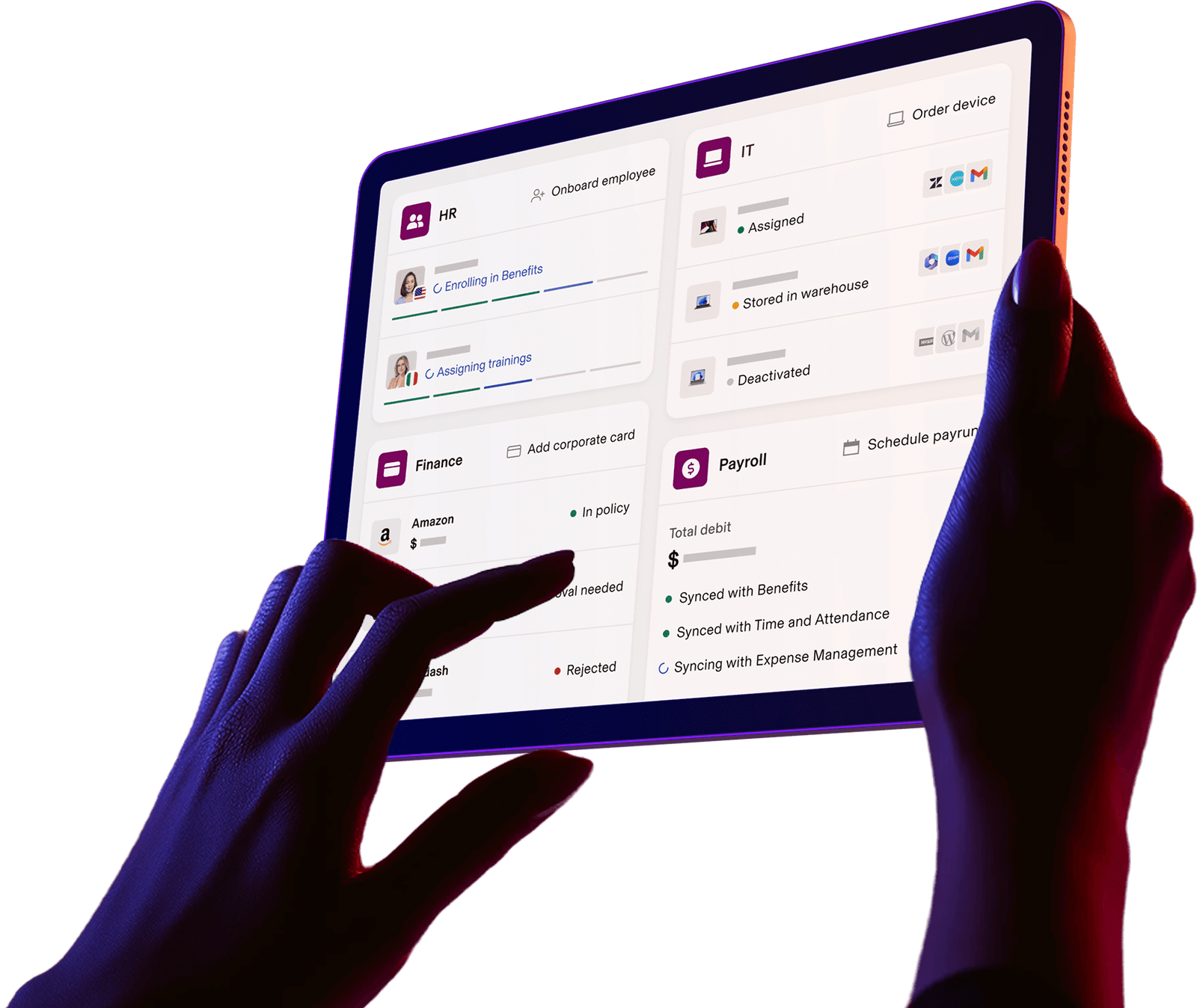
What It Does: Rippling connects HR directly to IT. The way it works is when you hire an employee, Rippling will automatically order them a computer, sign them up for Slack, and set up their email account as part of one overall process. Rippling was developed specifically for speedy HR applications at the startup level.
I Like This Tool Because: Is this sounding familiar? You hired a developer on Monday; however, they cannot begin coding until Friday because your IT department still needs to provision their access to GitHub. Rippling is the solution to that ridiculous gap. Think about this: every day a new employee sits idle costs you approximately $400 in lost income and lost opportunity costs. With Rippling, that amount is reduced to zero.
Statistical Reference: Gartner reported in 2025 that companies utilizing unified HR/IT processes have cut down their employee onboarding time by 78 percent compared to those using separate systems.
| Pros | Cons |
| 90-second onboarding workflows | Steep learning curve for HR generalists |
| Global compliance engine (185+ countries) | Overkill for teams under 10 people |
| Real-time headcount reporting | Support can be slow during US evenings |
Pro Tip: Use the “Trigger” function: Set a rule that when a salary hits $100k, automatically enroll the employee in a specific 401k plan. Hands-off compliance.
Deel – The Global Team Lifesaver
Best For: Startups with remote workforces that hire employees or independent contractors around the world.
Details: The cost for using Deel starts at $49 per month for one user in the United States. Then, costs can range from $5-$20 per employee or contractor, depending on your needs.
Functionality: Deel creates compliant employment contracts for every country where you plan to hire workers. Deel also makes it easy to exchange money across borders and helps handle various forms of visa support. This application allows users to create an automated system to manage their global workforce when they are working remotely.
Why I Like It: How many hours did you spend sending payments to designers based in Spain? How often did you send international wire transfers as part of the process of paying your freelance workforce? Since implementing Deel, I can pay my 15 freelancers who are located in 9 countries in less than 1 minute. However, the real value in using Deel has nothing to do with the payment. Deel provides employers with what is called an Employer of Record (EOR). An employer of record is responsible for all regulatory obligations related to employing foreign workers. Therefore, instead of needing to establish a shell corporation in Germany to employ a German worker, I simply need to add them to my list in Deel.
Most Recent Update: Deel released its new “Deel AI” product during the fourth quarter of 2025. Deel AI is designed to flag potential errors in the classification of contractors before you receive a notice from the Internal Revenue Service. In 2027, such predictive compliance functionality will likely become standard. At present, however, Deel AI represents a major competitive advantage for Deel.
| Pros | Cons |
| Handles 150+ currencies | Expensive for small domestic teams |
| Free visa support for relocations | UI feels crowded with features |
| 24/5 chat support (real humans) | Benefits differ wildly by country |
Pro Tip: Always run the “Cost of Living Adjustment” report before offering a contract to a remote hire. It saves you from awkward salary negotiations later.
DianaHR – The “HR Agent” That Works While You Sleep
Best for: Founders with no budget who don’t have an HR employee.
Details: DianaHR is not listed publicly. Only a wait list exists as of April 2026.
WHAT IS IT: This is the wild card. DianaHR is the world’s first production-grade “HR Agent”, not simply software that you use by clicking through screens, but an actual artificial intelligence that will do the work for you. As founded by the former head of engineering at Gusto, this is HR-as-a-service that uses a human-in-the-loop.
WHAT IT ACTUALLY DOES: You send DianaHR an email with a copy of your new hire’s offer letter. DianaHR’s artificial intelligence reads your offer letter, pulls out all the fields from your offer letter, asks you for missing signatures, and populates all of the information into your payroll system. NO FORMS. NO DATA ENTRY. NO TRAINING.
WHY I LIKE IT: I’d like to tell you a short story. My founder friend has an agency with 12 people. Every month, she spent 4 hours entering new contractor information into Gusto. NOT REVIEWING ENTERING. DianaHR reduced that down to 2 minutes. The AI even detected a missing W -9, which could have caused a delay in payment by two weeks.
Think about it, most HR software helps organize your chaos. DianaHR removes your chaos.
Important Note: Since DianaHR is still in its early access phase, it may not be right for many startups yet. However, it is perfect for early adopters who enjoy bleeding-edge technology. If you need mission-critical HR functions, stay with Gusto or Rippling until DianaHR is completely launched.
Recent Stats: DianaHR states that they can help business owners save over 15 hours per week and reduce their HR costs by 60%. While that seems extreme, if we assume the average founder spends over 10 hours per week on administrative tasks related to HR, then this calculation works out.
| Pros | Cons |
| Zero training required (just forward emails) | Still in the waitlist phase |
| Catches compliance errors before they happen | Not a full HRIS (yet) |
| Works alongside existing tools (Gusto, Rippling) | Pricing isn’t public |
Pro Tip: Join their waitlist now — even if you’re not ready. Early customers often get locked-in pricing that goes up once the product launches widely.
Comparison Table
| Software | Best For | Key Feature | Starting Price | Next Year Outlook |
| Gusto | Payroll simplicity | Auto tax filing | $40 + $6/user | Adding AI benefits reconciliation |
| Rippling | Unified HR/IT | Device provisioning | $35 + $8/user | Will likely acquire a legal compliance AI |
| Deel | Global teams | EOR + 150+ currencies | $49 + $5/user | Hyper-local benefits in APAC |
| DianaHR | Hands-off automation | Email-forward AI agent | Waitlist (TBD) | Public launch + full HRIS |
How to Choose the Best HR Software for Startups
Choosing the best HR software for startups starts with identifying where you’re losing the most time in your business.
You may have wondered which one to purchase.
- Price is not your priority. Identify your “pain point”.
- Are you afraid of the IRS? Purchase gusto. Gusto has the most lenient policy concerning payroll errors.
- Are you handling laptops & apps? Purchase rippling. In month one, the time saved in on-boarding it will pay for this product. (similar: workflow process automation tools)
- Are you hiring internationally? Purchase deal. International compliance feels like no big deal when using Deel.
- Do you simply want HR to go away? Add your name to the waitlist for Dianahr. Forwards emails > clicks buttons.
Top pick:
- New users: gusto. You can run payroll within 20 min.
- Lowest cost: deal. Contractor-heavy teams.
- Experienced user: rippling. Build custom api’s and automate everything.
- “I hate data entry: dianahr. Set it and forget it (Read: AI business automation tools)
Conclusion
It doesn’t matter how much software you use; there’s never going to be an app to help you enjoy doing paperwork. Choosing the best HR software for startups is about eliminating wasted hours and avoiding costly errors. When looking at what AI will do in Q3 2026 (flagging burnout issues before you even know they exist), companies like DianaHR are completely overhauling how we think about HR.
So instead of finding the cheapest option available, find the option that takes away one less decision you have to make every week. For example, try Gusto if you’re small or Rippling if you’re growing quickly. And if you’re hiring international talent, don’t forget about Deel. What is your worst HR horror story? Are you getting anxious about payroll? Do you struggle with onboarding new employees? Or do you get stressed when dealing with global employment compliance? Reply as a comment below. I personally respond to all comments.
What are some common issues when managing large numbers of employees?
One of the largest problems companies face when they reach eight employees is the burden on their managers. As soon as there are 8 employees, the time spent keeping track of who has how many hours available and whose birthday/anniversary it is turns into a full-time job.
Which would be best for a new company of ten employees, Gusto or Rippling?
Gusto is the better option because it is very easy to get going quickly. Gusto is well-suited for the non-tech founder. Rippling may be too much for a small company like yours. However, if you anticipate growing beyond twenty employees, or you want to manage all devices from one place, then Rippling may be right for you.
Will Deel work for a company based entirely in the U.S., or do I need to use it with international contractors/vendors?
Deel will work fine for a U.S.-based company. But Deel is also overpriced. Gusto provides everything you will need for domestic payroll. If you currently have at least one contractor or employee working outside of the country, or plan to hire someone in the future, then Deel will provide what you need.
Is DianaHR legitimate, or is it just hype about nothing?
DianaHR is legitimate. In fact, as of January 2026, DianaHR is already being used by actual clients. The legitimacy of DianaHR is further reinforced by its founding team coming from ex-Gusto engineering. However, DianaHR does not replace your current HR system fully. Instead, DianaHR should be thought of as an AI assistant that sits on top of your other systems. Therefore, for any mission-critical functions such as payroll processing, use either Gusto or Rippling.
Are these HR products compatible with my accounting product (Xero or QuickBooks)?
In terms of native integration, Gusto has the longest history and therefore the greatest level of support for integrating with Xero and QuickBooks. Rippling and Deel require a middleware tool such as Zapier in order to enable advanced general ledger (GL) coding. Make sure to always check out the “native integration” section of each product’s website before purchasing.