Email still delivers $36 for every $1 spent. No other marketing channel comes close to that ROI for small businesses with limited budgets.
But choosing the wrong platform wastes that advantage. Some tools are built for beginners. Others are built for automation-heavy e-commerce. Most small businesses pick the wrong one and pay for features they never use.
I tested 7 email marketing platforms specifically for small business use cases in 2026. Here is what each one actually does and who it is right for.
What to Look for in an Email Marketing Program
The next step is to determine which platforms would be best suited for a small business. Many businesses do not require advanced automation and/or segmented lists. At times, all a business requires is an easy-to-use interface and reliable delivery.
There are several considerations when selecting a platform:
- Ease of Use: An easy-to-learn platform will make things easier. If you don’t have a technical background, this is extremely important.
- Price Structure: There are two common pricing structures: By Subscriber Count and By Email Volume. Most free accounts have restrictions on either the number of subscribers or the email volume.
- Delivery: Emails must arrive in the inbox, not the spam folder.
- Automated Workflows: Basic automated workflows, such as welcome emails and follow-up emails, are a necessity. In time, even more advanced automated workflows may be necessary.
- Integration: Consider how the platform integrates with your website, shopping cart, and other programs you currently use.
- Reporting: Reporting and analysis of open rates, click-through rates, and conversion rates will help you better manage your campaigns.
- Support: Support from the company is vital to helping you avoid wasting hours of time troubleshooting issues.
Now that we know what features to look for in a platform, let’s take a look at the most popular options available in 2026.
Quick Comparison: Top Email Marketing Platforms at a Glance
| Platform | Free Plan | Paid Start | Automation | Best For |
| Mailchimp | Free (500 contacts) | $13/mo | Basic | Beginners, all-in-one |
| Constant Contact | 60-day trial | $12/mo | Basic | Local businesses, support seekers |
| Brevo | Free (300 emails/day) | $25/mo | Visual builder | Large lists, infrequent senders |
| ConvertKit | Free (1,000 subscribers) | $15/mo | Powerful tagging | Bloggers, creators |
| MailerLite | Free (1,000 subscribers) | $10/mo | Basic workflows | Budget-friendly, simplicity |
| ActiveCampaign | No free plan | $29/mo | Advanced + CRM | Growing businesses, e-commerce |
| Flodesk | No free plan | $38/mo flat | Simple | Creatives, design-focused |
Top Email Marketing Program for Small Businesses in 2026
1. Mailchimp
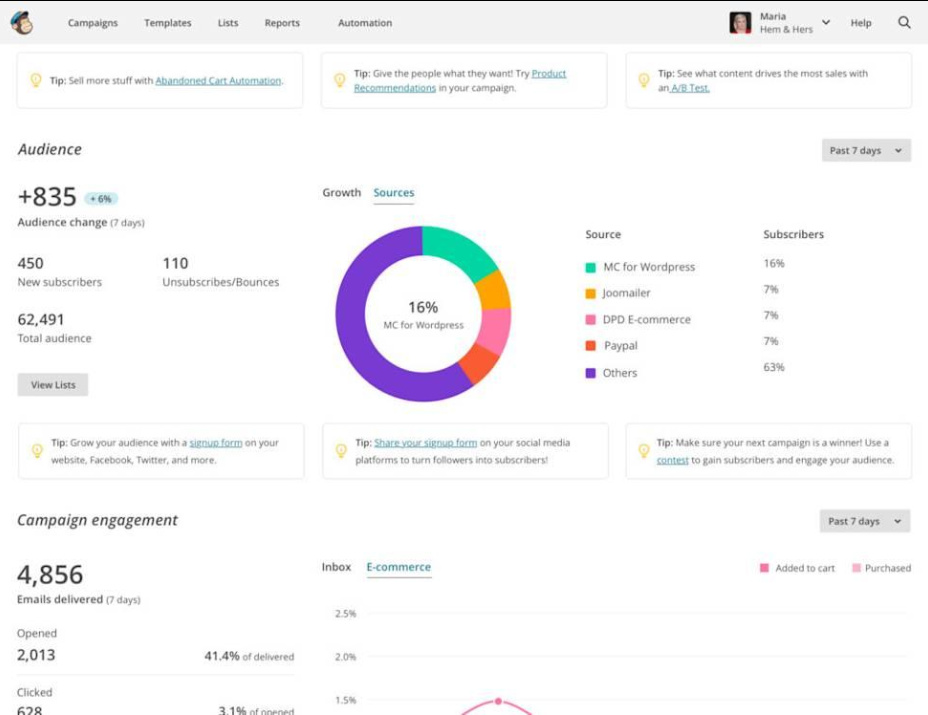
Mailchimp is one of the most popular email marketing programs for small businesses. The company offers a generous free plan and scales with your growing business. Starting as a simple email tool, Mailchimp has evolved into a full-service marketing tool that also offers landing pages, social media management, and basic CRM functionality.
Best For: New marketers or small businesses looking for an All-In-One marketing solution with plenty of room to grow.
Features:
- Drag-and-Drop Email Builder with Pre-Designed Templates
- Segmentation by Behavior/Preferences
- Basic Automation (Welcome Emails, Order Follow-up Emails, Re-engagement)
- Analytics: Open Rates, Click-Through-Rates, Revenue Tracking
- Shopify, WooCommerce, WordPress, and hundreds of Apps Integration
Pricing:
Free: Unlimited Contacts, 12,000 Monthly Emails. Basic Templates, Forms.
Paid Plans: Starting at $13 per Month. Unlimited Contacts. Increasing Monthly Emails. Multi-Step Automations, A/B Testing, and More.
Pros
- Easy-to-use Interface Suitable for New Marketers
- Well-Known Brand. Extensive Integrations Available
- Generous Free Plan. No Commitment Required to Test
Cons
- Expensive Pricing Model as List Grows
- Many Users Have Disliked Recent UI Changes
- Limited Automation Options on Lower-Tiered Plans
2. Constant Contact
Constant Contact has been around since the early days of email marketing, and it has always focused on providing the best possible customer service. This is why many local businesses, non-profit organizations, and organizations have a high regard for this company as well as its commitment to personal help and assistance by phone.
Best For:
Small Business Owners Who Want Reliable Support and an Easy Way to Send Emails Without Having to Learn A Lot About Email Marketing.
Features
- Email Editor That Is Very Easy to Use and Has Hundreds of Templates Available
- Tools for Managing Lists With Segmentation
- Features for Events (Invite, Registration, Ticketing)
- Manage Your Social Media Posts and Ads
- Reporting and Tracking Engagement
Cost
There is no free subscription; however, you can use their product for 60 days at no cost.
After your trial ends, they will begin charging you at least $12.00 per month if you wish to send emails to 500 or fewer people, depending on your annual billing frequency.
Pros
- The customer service team at Constant Contact is excellent; they can be reached by phone, through a live chat feature, and by email.
- It is very easy to set up Constant Contact, which makes it perfect for those new to the world of email marketing.
- They have excellent tools for managing events.
Cons
- Constant Contact does not offer a free subscription other than during the trial.
- Some of the automation features may not be as good as those of some other companies.
- In some places, the interface may seem old.
3. Brevo (formerly Sendinblue)
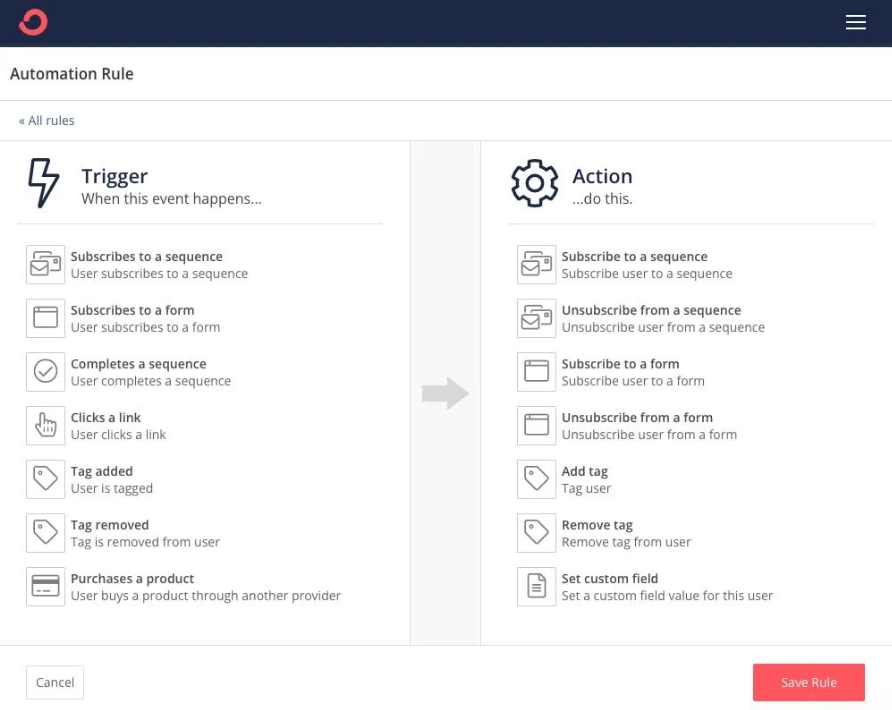
The price structure at Brevo offers a different approach that could be beneficial for small businesses with large lists, yet lower sending volumes. They charge based on the number of emails sent as opposed to the size of your list. Therefore, they are priced more competitively for the same amount of email traffic.
Best for:
- Companies with large contact lists that do not regularly send emails.
- Companies use SMS marketing in conjunction with email.
Email/SMS Marketing:
- Both email and SMS marketing are available on the same platform.
- Transactional Email Support.
- Visual Marketing Automation Workflows.
CRM/Landing Page Builder:
- Built-in CRM.
- Landing Page Builder.
Integration:
Facebook Ad Integration.
Pricing:
- Unlimited Contacts/Up To 300 Emails Per Day: FREE.
- Paid Plans: Starting at $25/Month for 20,000 Emails Monthly, includes additional automation features and reporting capabilities.
Advantages
- Pay for What You Send Not How Many Subscribers You Have.
- Includes SMS Marketing On Paid Plans.
- Visual Marketing Automation Workflows Are Available On All Plans.
Disadvantages
- Interface is less polished compared to Mailchimp and Constant Contact.
- Daily Email Volume Limitations On The Free Plan May Be Inadequate for High Volume Sending Organizations.
- Deliverability Is Subject to the Sending Practices.
4. ConvertKit
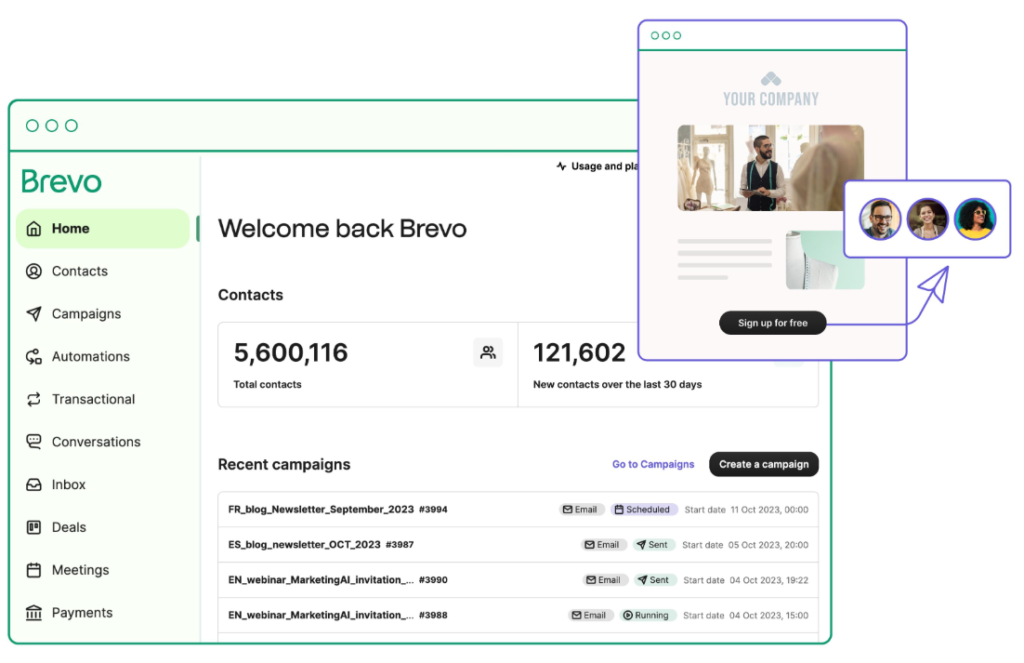
ConvertKit was designed to help creators (bloggers, podcasters, authors, etc.) create and manage their audiences. ConvertKit is focused on automating processes and segmenting audiences based on tags to help nurture leads through content creation.
Best For: Content creators/bloggers/solopreneurs who want strong tagging and automation options to build a loyal audience.
Key Features
- Visual automation builder using triggers and actions
- Tag-based subscriber management instead of traditional “lists” of subscribers
- Customizable sign-up form/landing page creation
- Commerce tools for selling digital products
- Subscriber scoring to determine which contacts are most engaged
Pricing
Free plan available: Up to 1000 subscribers, and has forms and landing page capabilities
Paid subscriptions: Plans start at around $15 per month for 300 subscribers. This includes unlimited emails and unlimited automation
Pros
- Created specifically for content-driven business types
- The tagging system allows for simple segmentation of subscribers
- Easy-to-use, clean, distraction-free interface
Cons
- Does not have a library of templates. Emails are text only.
- Limited to creating complex product integrations for e-commerce type businesses
- Reporting capabilities are much simpler compared to those of other competitors
5. MailerLite
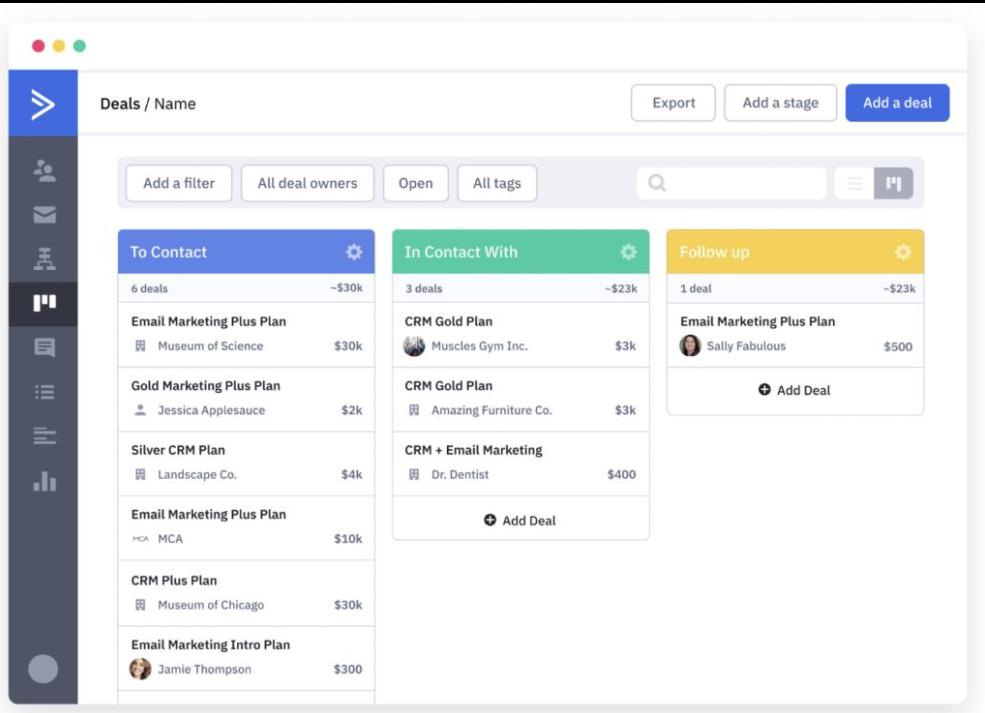
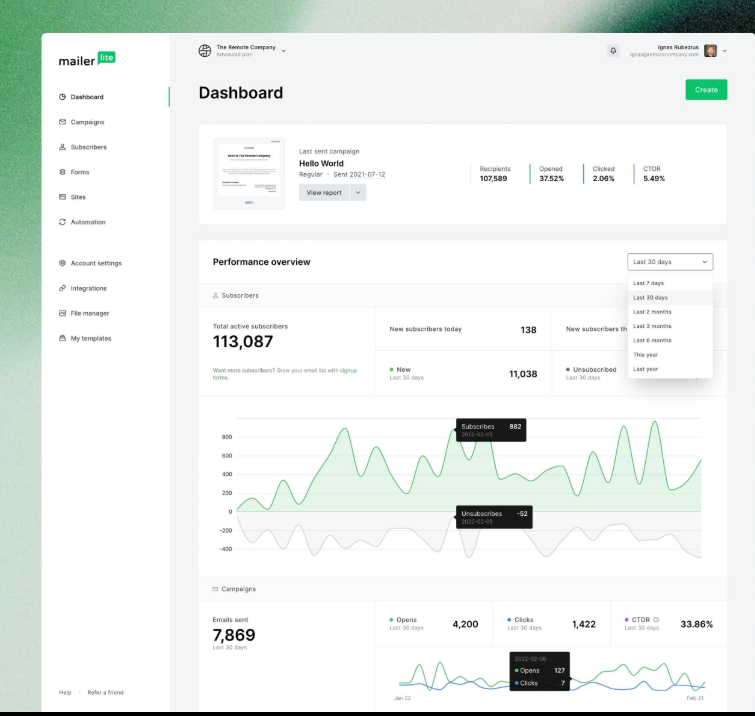
Mailer Lite is frequently referred to as a less expensive alternative to MailChimp. It has an interface that is simple to understand, provides basic automation, and offers a generous free option. This makes it easier for many small business owners to find a good balance of features and ease of use.
Ideal For: Budget-Friendly Small Businesses and Newcomers Who Want a Straightforward Tool Without Limiting Their Ability to Automate.
Some Key Features:
- Drag-and-Drop Editor for Emails That Are Responsive Templates
- Landing Page/Pop-Up Builder
- Basic Automated Workflows (Welcome Emails, Birthday Messages Etc.)
- Detailed Analytics with Click Maps
- Website Builder Included on Some Plans
Pricing:
Free: 1,000 Subscribers / 12,000 Monthly Emails
Paid Options: The paid options start at about $10 per month for 1000 Subscribers with Unlimited Emails and Priority Support
Pros
- Reasonable Prices and Generous Free Tier
- Modern and Simple Interface, Which Is Easy to Learn
- Basic Automation Functions Available Even On Lower-Tier Plans
Cons
- Fewer Integrations Than Larger Platforms
- Customer Service is Primarily Via Email
- More Complex Functionality Such As Multi-Step Automated Workflows Requires Higher Level Plans
6.ActiveCampaign
Active Campaign is a Top Marketing Automation Platform for Small Businesses
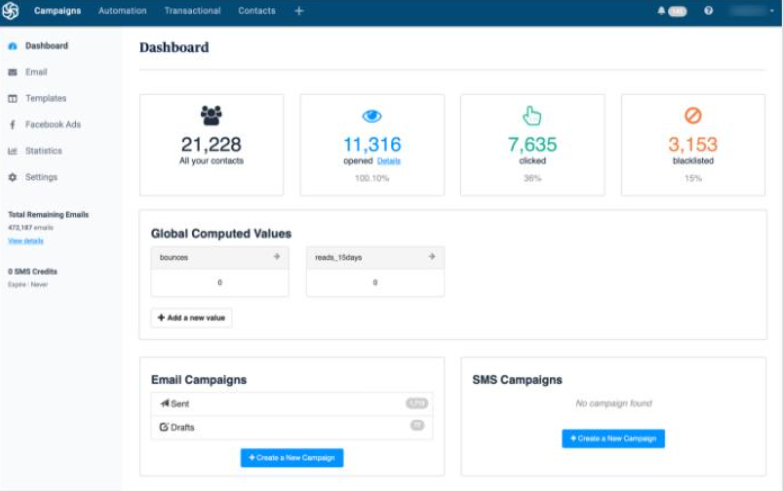
Active Campaign is an incredibly powerful marketing automation platform. What makes Active Campaign so unique is that they have brought together Email Marketing, CRM (Customer Relationship Management), and Sales Automation all under one roof. While it may take some time to learn how to use it, if you are looking for a flexible way to automate your marketing efforts as a growing small business or e-commerce store, this is the perfect platform.
Best For: Growing small businesses and e-commerce stores that want to automate their marketing, use lead scoring, and track customer interactions through a built-in CRM.
Visual Builder:
- Hundreds of Triggers and Actions
CRM:
- Built-in CRM with Deal Tracking
Tracking:
- Site tracking to see which pages visitors to your site are visiting
Marketing:
- SMS Marketing
- Facebook Custom Audiences
Integrations:
- Deep Integrations with E-Commerce Platforms
Cost:
- No Free Plan, however, there is a 14 Day Free Trial Available
- Paid Plans begin at $29/month for up to 500 Contacts; Annual Billing Only
Pros:
- Leads the industry in terms of automation capabilities
- Brings together Email Marketing and CRM under one roof
- Ideal for businesses using lead nurturing and sales pipeline processes
Cons:
- More expensive than most entry-level marketing automation tools
- Has a steep learning curve for new users
- Offers more features than most small businesses will ever be able to utilize
7. Flodesk
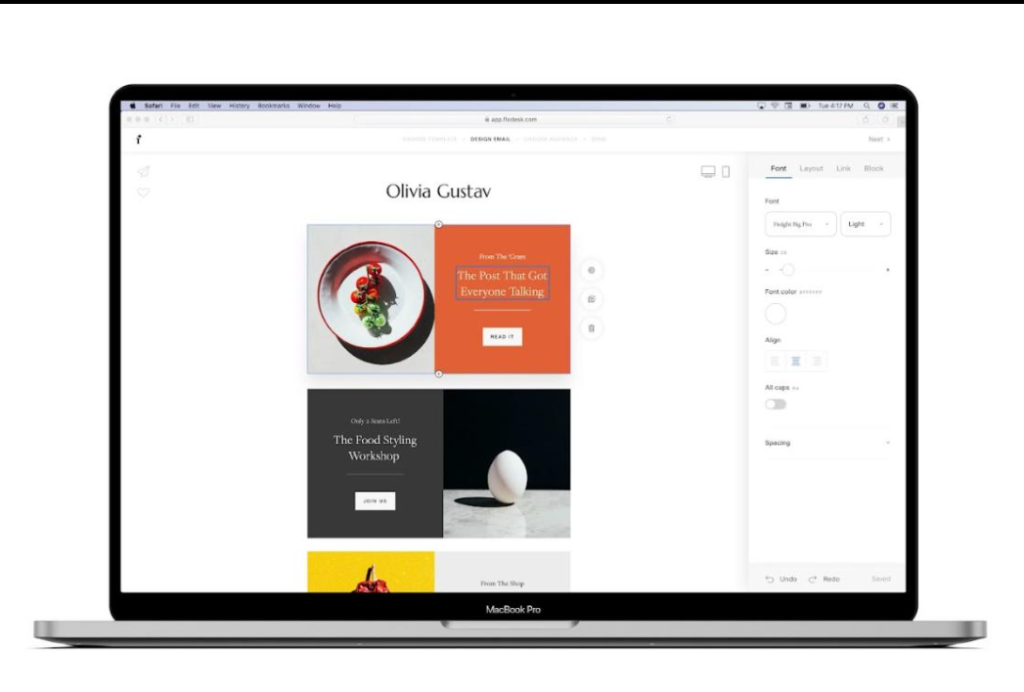
Flodesk is gaining recognition due to the visually appealing email templates it offers. One of the biggest advantages of Flodesk is the flat rate pricing, no matter how many subscribers you have. This is great for businesses that are growing their email lists.
Best for: Designers/creatives/small businesses looking for a simple design template and a fixed price per month.
Key features:
- Stylized email builder with designer templates.
- Basic automated welcome sequence/lead magnet capabilities.
- Basic reporting for open/click data.
- Customizable forms and checkout pages.
Pricing
- No free plan. A 30-day free trial is available.
- Flat Rate: $38/month ($418/year), for unlimited subscribers/unlimited emails.
Pros
- Predictable pricing that does not grow as your email list grows.
- Your emails will look professional with little effort.
- The user interface is simple and focuses on design.
Cons
- Less automation capability compared to ConvertKit/Active Campaign.
- Fewer third-party app integrations.
- Reporting is basic—no advanced analytics.
Pro-Tip: Compare at least two different platforms for 14 days before investing. Send the same campaign to the same list via each platform, then evaluate based on open rates, deliverability, and ease of use.
Free vs. Paid: Which One Should You Choose?
Here’s a quick comparison of the best email marketing programs for small businesses in 2026. Many small business owners use a free plan to test the waters before they begin paying for an email platform. Free plans are perfect for learning the basic elements of email marketing, building your first few email sequences, and determining whether or not email marketing is something that will fit into your business model.
Free Plans Have Several Limitations:
Some free platforms have branding in your emails, as well as some form of their logo.
Most free plans do not allow you to save over 1000-2000 subscribers.
Automated workflows (e.g, auto-responses, A/B tests, etc.) and advanced reporting features are also available on paid plans.
In most cases, it is wise to upgrade to a paid plan once your subscriber list grows to around 500-1000.
ROI Comparison: Free vs. Paid
| Plan Type | Monthly Cost | Subscriber Limit | Est. Revenue per 1,000 Emails |
| MailerLite Free | $0 | 1,000 | $0–$100 |
| MailerLite Paid | $10 | 1,000+ | $200–$600+ |
| ActiveCampaign | $29 | 500+ | $400–$1,000+ |
*Based on industry averages for e-commerce and service businesses. Actual results vary. According to Campaign Monitor, businesses that segment their email lists see up to 760% increases in revenue.
How to Choose the Right Email Marketing Program for Your Business
The best email marketing program for a small business in 2026 will depend on your own individual needs. Here is an easy way to narrow down what best fits your own unique situation.
If you are completely new to email marketing, try using either Mailchimp or MailerLite. Both of these offer free versions, and both have a very user-friendly interface.
If customer support is most important, Constant Contact offers a lot of great customer service options, including 24/7 phone support and has many resources available to help you get started.
If you have a large number of contacts but do not frequently send emails, Brevo could be a good option for you, as its pricing structure may allow you to save money.
If you are a blogger or content creator, ConvertKit was made specifically to fit into your workflow and to help grow your audience.
If you are looking to use automation and also integrate with your Customer Relationship Management (CRM) software, once your business grows enough to justify the cost, Active Campaign may be a worthwhile investment.
If you are looking for a tool that allows you to focus primarily on the design of your emails, Flodesk is a fantastic tool that will make it very easy for you to design beautiful and visually appealing emails.
Quick Starter Pack Recommendations
| Level | Platform | Why |
| Beginner | Mailchimp Free | Zero cost, easy setup, great for learning |
| Intermediate | MailerLite Paid | Affordable, good automation, scales to 10k subscribers |
| Advanced | ActiveCampaign | Full automation, CRM, ideal for 10k+ lists with complex funnels |
Pro tip: Most platforms offer free trials, so you can test two or three before committing.
Email Marketing Best Practices for Small Businesses
There are two parts to selecting the proper software: the selection of that software and how you will utilize it. The following are a few practical suggestions to help you achieve better results:
1. Obtain Your List Ethically
Never purchase an email list. Only focus on collecting subscribers who are interested in hearing from you. Use a sign-up form on your website to obtain their contact information; offer them a lead magnet, such as a discount or a guide; or request their email address when they complete an online transaction or interact with you in person.
2. Divide and Conquer – Segment Your Audience
If you are sending the same email to all your subscribers, you may experience decreased reader response. Grouping subscribers based upon their interests, past purchases, and/or geographic location, even the simplest grouping can improve reader response.
Example: If a local bakery segmented its customer base into “pastry lovers” and “custom cake shoppers,” it would be able to send both groups relevant marketing messages rather than sending one blanket message to both groups.
3. Emphasize the Value – Not Just the Sales Pitch
No one wants to continually receive sales pitches. Offer your readers valuable tips, provide insight into what happens “behind the scenes,” or give them access to exclusive deals. Find a balance between promotional emails and helpful information.
Example of welcome email:
Subject: Thank you for joining us! Save 15% off your first purchase.
Hello [Name], thank you for subscribing to our newsletter. We appreciate you taking the time to subscribe. As a token of appreciation, we have provided you with a discount code. Below is a quick guide to maximize your experience with our product(s).
4. Test and Improve
Test different subject lines, test the timing of your email sends, and test various formats of your email content. Most email service providers allow you to run A/B tests to see which versions of your email are performing best. While individual results may vary, the cumulative effect of making incremental changes to your email marketing strategy will result in improved performance.
5. Monitor Deliverability
Occasionally, you remove inactive subscribers from your email list. High levels of bounces and low levels of reader response can negatively impact your sender reputation. When this occurs, many email services will flag your emails as spam and prevent them from being delivered to your subscribers.
6. Take Advantage of Automation
Automate common tasks using workflow automation:
- Welcome series: Send a series of emails (typically 3-4) that introduce your company/brand to new subscribers
- Cart abandonment follow-up: Send a reminder to abandon carts within 24 hours of a user leaving items in their shopping cart
- Re-engagement campaign: Send a message to inactive subscribers
What Users Are Saying
“Mailchimp became too expensive for us once we had grown past the free tier. We like that MailerLite has an easier-to-use interface, and we are also spending less money than we were with Mailchimp; plus our open rates have improved.”
Sarah T., owner of an online boutique.
“The Active Campaign lead nurturing process has changed our lead nurturing. Although it took me some time to learn how to use the Active Campaign automation builder, I now save at least two hours per week. Since switching to Active Campaign from another company, we have seen a 40% increase in sales via email.”
Marcus R., owner of a marketing agency.
“I am a photographer. The beauty of Flodesk is that it allows my emails to look just as polished as my photos. My clients always comment on how professional they think my newsletters look.”
Jessica L., wedding photographer
Conclusion
Choosing the right email marketing program can make a huge difference in how effectively you connect with your audience and grow your business. With so many tools available in 2026, the key is not to find the “perfect” platform but to choose one that fits your current needs and skill level.
The best email marketing program is the one that you will actually use consistently. Whether you start with a free tool like MailerLite or invest in advanced automation with ActiveCampaign, what matters most is taking action.
Instead of overthinking your decision, pick an email marketing program, build your list, and send your first campaign. Over time, you’ll learn what works best for your audience and optimize your strategy for better results.
Are there free email marketing services for small businesses?
Both MailerLite and Mailchimp are solid choices. MailerLite offers a free plan that has a limit of 1,000 subscribers and 12,000 monthly emails. On the other hand, Mailchimp offers a free plan but limits the number of subscribers to 500 and the number of emails sent to 1,000 per month.
Are email marketing programs still effective in 2026?
Yes, email marketing programs remain one of the most effective digital marketing channels. On average, businesses generate around $36–$40 for every $1 spent, making it one of the highest ROI channels available.
May I change my email marketing service?
You can. Most email marketing services allow you to export your subscriber list as a CSV file so you can use it when setting up a new service. However, you will have to recreate the automated sequences and templates in the new service.
What is the best service for e-commerce?
All three (ActiveCampaign, Klaviyo, and Mailchimp) have deeper integration with e-commerce platforms such as Shopify and WooCommerce. They also include features for sending emails based on the shopping activity (e.g., “abandoned cart” and “purchase follow-up”) of customers.
How many dollars should a small business expect to spend on email marketing?
Most small businesses will spend somewhere between $15 to $50 per month on email marketing services. The cost will generally increase as your list size grows. According to Campaign Monitor, the average Return-On-Investment (ROI) for email marketing for small businesses is 42:1. So if you were to invest $50 per month, it could be worth over $2,000 in potential sales.