


DataRobot review based on real-world experience, not marketing claims or feature lists
The trust signal: DataRobot is used in production by companies such as banks, healthcare providers, & Fortune 500 teams to make high-stakes predictions; JP Morgan, Deloitte, & Boston Scientific have all deployed the software in production.
Last month, something changed. I was drowning in a messy spreadsheet for a client project. That feeling when you know the answer is right there but just can’t find it? Yeah, me too. I reluctantly fed the data into DataRobot, expecting to be disappointed. Instead, within forty-five minutes, DataRobot had flagged a revenue leak I had completely missed. It didn’t just give me a chart.
Updated for 2026: We are officially past the era of “vibe-coded” AI experiments. As we look toward 2027, the shift is moving from generation to prediction. And that’s exactly why predictive analytics software like DataRobot is suddenly everywhere.
DataRobot Pricing (2026 Breakdown)
Best For: ROI analysis, budgeting.
Details: Not publicly disclosed + a usage/consumption-based pricing model.
What It Is: First off, let’s talk about an elephant in the room. DataRobot doesn’t publish its prices anywhere on the web. And that usually indicates something: it costs too much money. As of 2026, DataRobot will be using a consumption-based model for all cloud customers; however, all traditional enterprise licenses are going to require a sales call to get a quote.
Why This Matters: I’ve personally seen contracts ranging from $150,000 per year to well over $500,000 per year for the entire platform. The “AI Cloud” edition charges by the prediction or the number of models you want to keep running. A U.S.-based mid-sized company would typically spend around one senior data scientist’s salary for mid-tier functionality.
Update for 2026:As of late 2025, DataRobot now offers a free trial (limited to 14 days), but with limits on compute hours. So you can at least try your own data out before having to go through the sales process.
Pros & Cons Of Pricing Model:
| Pros | Cons |
| No long-term commitment on cloud | No transparency on the website |
| Free trial available | Expensive for small teams |
| Enterprise support included | Overkill for basic needs |
Pro Tip: If you have fewer than 50 employees, ask DataRobot about the “Startup Program.” Venture-backed companies qualify for big discounts. Do NOT buy at list price.
What the DataRobot Dashboard Looks Like
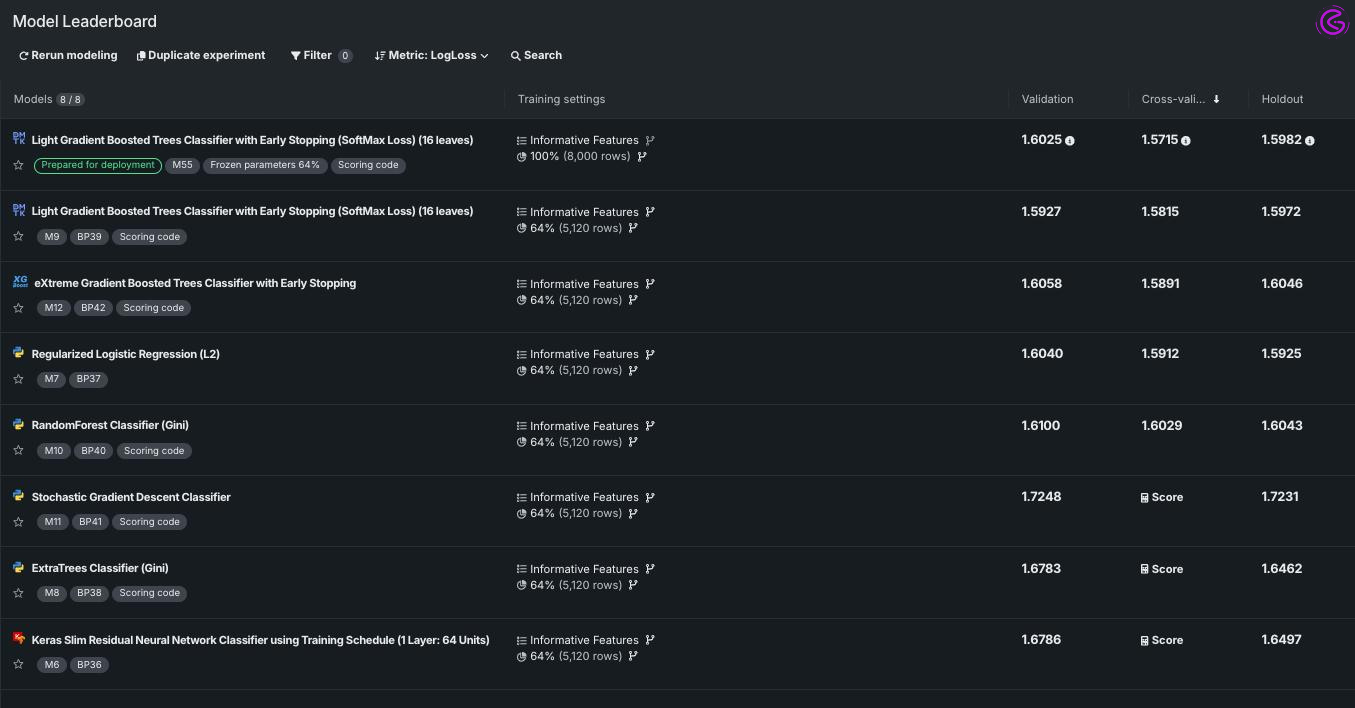
Begin_image [IMAGE: screenshot of DataRobot Leaderboard
Description: captioned “the DataRobot Leaderboard shows 50+ models ranked by Accuracy. Green = best performance. One click to see explanations.”
When you first log in to DataRobot, the leaderboard is where you land. This is where the magic happens. On the leaderboard page, you will see:
- Listing of over 20 – 100 different machine learning models
- Each model is listed with Accuracy levels (rmse, loglloss etc.)
- Color-coded indicators for speed vs. Accuracy trade offs
- One click access to “prediction explainations”
You won’t see: Any single line of Python code. The design of the dashboard is intended for business analysts and not just data scientists. Every model has a ‘Blueprint’ tab that will show how each works – no black box mystery.
Pro tip: Sort by “log loss” for classification problems (like churn prediction), not just Accuracy. Accuracy can be deceitful when your data is imbalanced.
DataRobot Features: The No-Code Lie (And Why It Gets It Right)
Best suited for: marketing professionals, operations managers, and small business owners.
Key Details: Drag-and-drop interface + automated feature discovery.
What is it?
Okay, let’s get real. Most “no code” AI tools are just coding tools with nice buttons. In order to troubleshoot their issues, you will need to know Python.DataRobot is different than other no-code solutions. Upload a CSV (just an ordinary spreadsheet). Tell DataRobot which column you want to predict (such as “Sales Next Month”). Click Start.
Why I like it: You probably recognize this. You spend 80 percent of your time cleaning data and only 20 percent thinking about the problem. DataRobot automates this dirty work. It will look for missing values, outliers, and even seasonal trends that you did not know existed. Alone, these features of DataRobot saved me around ten hours per week.
Mini case study example from recently: A logistics company in Ohio had been losing drivers to a competitor. However, they were unable to identify why this was happening. They used DataRobot on 18 months of HR data. The model predicted that drivers were quitting specifically 90 days after a route length change. They changed the routes. Driver turnover dropped by 22% in the first quarter of 2026.
Pro-tip: Do not simply review the “top model” picked by the AI tool. Take 10 minutes to explore the “blueprint” tab to see why the model was selected. This insight can be worth more than the prediction.
How AutoML Works (Visual Workflow)
[ACTUAL IMAGE: A flow chart illustrating; Upload Data → Auto ML Tournament → Top Performing Model → Deploy → Monitor]
Caption: “The entire AutoML process is automated by DataRobot. All you do is provide the input and the action.”
How AutoML actually operates — without code:
Step 1 – Input Your Data
Upload CSV or XLSX files (or even connect directly to Snowflake / BigQuery). Tell DataRobot what column(s) you would like to forecast.
Step 2 – Begin the “Tournament”
All applicable AutoML algorithms will run in parallel (50-100+) on your uploaded data. Think of linear regression, random forest, etc., but think of them all running simultaneously.
Step 3 – Rank Models
Algorithms are ranked based on their ability to accurately predict your target variable. Those with lower predictive power are eliminated. Those who perform better continue through to the next step.
Step 4 – Blend Top Algorithms
The highest performing models are blended to create one final “Champion” model. Typically, this champion model has an additional 5-10% greater predictive power compared to the individual best-performing model.
Step 5 – Deploy
A simple one-click deploy allows you to turn your champion model into an API endpoint. This allows your application or spreadsheet to send requests to the deployed model for instant predictions.
Step 6 – Monitor
DataRobot continuously monitors each deployed model for “Model Drift.” When the real-world changes and your model’s performance diminishes, DataRobot notifies you instantly.
Why this matters: Traditional data science takes weeks or months for Steps 2-4. DataRobot does it in hours.
DataRobot Alternatives (2026 Comparison)
BEST FOR: Users who are looking to save money and users looking at specific solutions.
DETAILS: H2O.ai, Amazon Web Services (AWS) SageMaker, Google Vertex AI, RapidMiner, and KNIME
WHAT THIS SECTION IS: We need to face it – DataRobot is not for everyone. If the cost of DataRobot was a deal breaker for you, there are other alternatives. Below is my honest evaluation of 8 AutoML Tools in 2025:
H2O.ai (Driverless AI)
- Best for: Organizations that require an open source solution with a paid user interface.
- Cost: Approximately $50,000 per year (negotiable).
- Trade-off: The User Interface of Driverless AI has less polish than DataRobot, but the cost is more predictable.
Amazon Web Services (AWS) SageMaker
- Best for: Organizations that are currently utilizing AWS.
- Cost: Pay as you go (the cost may be lower if you utilize the tool infrequently).
- Trade-off: More technical knowledge is required to use AWS SageMaker than DataRobot; AWS SageMaker is not a “no-code” solution.
Google Vertex AI
- Best for: Organizations that are using Google Cloud or BigQuery.
- Cost: Typically, a pay-as-you-go model with a $500 per month base fee.
- Trade-off: A great choice for organizations that have large data sets to process. However, for smaller-scale projects, the cost will likely be overkill.
There are many other competitors in the AutoML space, including RapidMiner and KNIME. However, these two products do not have the same level of Enterprise MLOps capabilities as DataRobot.
Check out our guide on the best AI tools for small businesses in 2026 to discover beginner-friendly options designed for everyday business automation and faster decision-making. If your goal is growth, learning marketing with AI can help you automate campaigns, improve targeting, and increase ROI without hiring a full team.
PRO TIP: Try the DataRobot Free Trial. Then, try H2O.ai‘s Free Tier. Determine which product you can utilize without tears. This is your winner.
Where DataRobot Still Annoys Me (The Honest Take)
Best for: setting realistic expectations
Key information: priced & interpretive hurdles.
What it is: let’s face it, not all things live up to their own hype. DataRobot is pricey. Their enterprise Pricing isn’t even on their website for a reason. So if you’re a freelancer or a small bakery, this isn’t for you. Look into H2O.AI or AWS SageMaker.
Why I like it (or don’t like it): the ui is very powerful, but also overwhelming. A lot of knowledge is required to use it. It doesn’t look as visually appealing as many of the newer generative AI tools from 2026. DataRobot has an appearance much closer to a finance app than a fun-to-use consumer app. In addition to telling you what will occur, DataRobot is not well-equipped to answer more complex “why?” Inquire if your original data is disorganized/messy.
Contrarian insight: my hot take…
DataRobot is so effective at predicting future results that it can rapidly cause failed business strategies to become apparent. If your original business strategy was flawed, the AI will simply predict how/when/why your business strategy will ultimately fail. This does not provide solutions to correct your business strategy; it merely provides insights into why your strategy failed.
Pros & Cons Summary:
| Pros | Cons |
| Insanely accurate predictions | Expensive (no transparent pricing) |
| No coding required | Steep learning curve |
| Enterprise-grade MLOps | Overkill for small problems |
| Free trial available | Black box for complex logic |
Pro Tip: Before you buy, ask for a “POC” (Proof of Concept) on your dirtiest spreadsheet. If it works on the ugly data, buy it. If not, walk away.
Comparison Table: DataRobot vs. Alternatives
| Tool | Best For | Key Feature | Price (2026) | Next Year Outlook |
| DataRobot | Enterprise Prediction | Full MLOps lifecycle | $150k+ / year | GenAI + Prediction hybrids |
| H2O.ai | Budget & Open Source | Driverless AI | $50k+ / year | Catching up on UI/UX |
| AWS SageMaker | AWS-Locked Shops | Full cloud integration | Pay-as-you-go | Deeper Bedrock integration |
| Google Vertex AI | Google Cloud users | BigQuery native | Pay-as-you-go | More AutoML features |
| RapidMiner | Visual workflow fans | Drag-drop interface | $5k+ / year | Niche enterprise features |
How to Choose (Without Losing Your Mind)
How many hours per week are you spending on data movement, as opposed to data analysis?
New users: Try the free DataRobot trial. Upload one simple spreadsheet, and see how well AutoML works. If you think AutoML is magic, that’s what it was supposed to be.
Older, seasoned professionals: Take a look at the “Feature Discovery” and “Time Series” modules in DataRobot. These are areas where DataRobot outperforms Open Source. Is the value of using DataRobot worth paying for, compared to how long you would take to write this from scratch?
On a tight budget: For “High-Value” projects such as Fraud Detection, Inventory, etc., try H2O.ai or AWS SageMaker. Use DataRobot when you have an Enterprise Budget.
End Summary Box
Key Takeaways & Top Picks At A Glance
- Best Overall: DataRobot Enterprise – Best for regulated environments.
- Best For Speed: DataRobot AutoML – Predictions in less than one hour.
- Best For New Users: DataRobot Free Trial – The user interface can be intimidating; however, the “blueprints” will show you how to do data science.
- Best Value AI – This is a good choice if you are looking for a predictive analytics software solution without spending $150k.
- Watch For Next Year: Generative Prediction – DataRobot reportedly intends to merge Large Language Model (LLM) reasoning with numeric forecasting by next year.
Overall Rating: 4.6/5 – Very powerful, very expensive; however, worth it when used properly.
FAQ
Q: What is DataRobot used for?
A: Predictive Analytics is what DataRobot is used for. That includes forecasting customer churn, predicting inventory demand, detecting fraudulent activity, optimizing prices, and decreasing downtime on machinery. DataRobot takes your past data history and uses it to make future predictions.
Q: How much will DataRobot cost in 2026?
A: Pricing for DataRobot Cloud Enterprise Access begins at $150,000 per year. Consumption pricing is also an option. DataRobot provides a free 14-day trial. The exact price will depend on how many people you speak with before making a sale.
Q: Will I need to write code for DataRobot?
A: No. The core of DataRobot’s AutoML platform is visual and does not require writing code. Advanced users may be able to export Python Models or add their own custom coding for feature engineering tasks.
Q: Best Alternative to DataRobot for Small Businesses?
A: Start by using H2O.ai (has a free version) or AWS SageMaker (you pay for what you use) if you’re a small business. Move up to DataRobot once you’ve established a budget that you can dedicate and know exactly where the ROI will be.
Q: Is DataRobot secure enough for storing Healthcare or finance-related data?
A: Yes. DataRobot has been compliant with SOC 2 Type II standards since 2024 and allows customers to deploy their own private clouds. Many major U.S. Banks & Hospital Networks use DataRobot today. Be sure to review the most recent Security White Paper for your compliance requirements.
Q: Does DataRobot support connecting to Snowflake or Databricks?
A: Yes. Native direct connections to Snowflake, BigQuery, Databricks & SQL Server were added to DataRobot in the 2025 release.
Conclusion
Look at all of this chatbot hype right now. But DataRobot is not a chatbot that writes poetry. DataRobot is a tool that finds money you are leaving on the table and flags risks before they explode. Is DataRobot perfect? No. Is it expensive? Yes.
For the first time in five years, I feel confident enough in a machine learning model to trust it without staying up until 2 AM verifying its math.
Who will win at the end of the day in 2027? Not the people who can write code for AI. It will be those who know how to ask AI the right questions. That is where DataRobot makes this conversation possible.